
Chapter 68
Building a Conversational Search Agent with Agent Engine and RAG on Vertex AI Search
# Copyright 2024 Google LLC
#
# Licensed under the Apache License, Version 2.0 (the "License");
# you may not use this file except in compliance with the License.
# You may obtain a copy of the License at
#
#     https://www.apache.org/licenses/LICENSE-2.0
#
# Unless required by applicable law or agreed to in writing, software
# distributed under the License is distributed on an "AS IS" BASIS,
# WITHOUT WARRANTIES OR CONDITIONS OF ANY KIND, either express or implied.
# See the License for the specific language governing permissions and
# limitations under the License.
Building a Conversational Search Agent with Agent Engine and RAG on Vertex AI Search
Share to:
| Author(s) | Kristopher Overholt |
Overview
Agent Engine in Vertex AI
Agent Engine is a managed service in Vertex AI that helps you to build and deploy agent frameworks. It gives you the flexibility to choose how much reasoning you want to delegate to the LLM and how much you want to handle with customized code. You can define Python functions that get used as tools via Gemini Function Calling. Agent Engine integrates closely with the Python SDK for the Gemini model in Vertex AI, and it can manage prompts, agents, and examples in a modular way. Agent Engine is compatible with LangChain, LlamaIndex, or other Python frameworks.
Objectives
In this tutorial, you will build and deploy an agent (model, tools, and reasoning) using the Vertex AI SDK for Python.
Your agent will use LangChain and Vertex AI Search to retrieve structured data indexed from the Movies Dataset on Kaggle using retrieval augmented generation (RAG).
- Install the Vertex AI SDK for Python
- Define a model for your agent
- Define Python functions as tools so that our agent can:
- Search and retrieve movie information from Vertex AI Search
- Use the LangChain agent template provided in the Vertex AI SDK for Agent Engine
- Test your agent locally before deploying
- Deploy and test your agent on Agent Engine in Vertex AI
Enable APIs and Services
This tutorial uses the following billable components of Google Cloud, which you'll need to enable for this tutorial:
Learn about Vertex AI pricing and use the Pricing Calculator to generate a cost estimate based on your projected usage.
Getting Started
Install Vertex AI SDK for Python
Install the latest version of the Vertex AI SDK for Python and extra dependencies related to Agent Engine, LangChain, and Vertex AI Search:
%pip install --upgrade --quiet \
    "google-cloud-aiplatform[agent_engines,langchain]" \
    langchain-google-community \
    google-cloud-discoveryengine \
    google-api-python-client
Authenticate your notebook environment (Colab only)
If you are running this notebook on Google Colab, run the following cell to authenticate your environment. This step is not required if you are using Vertex AI Workbench.
import sys

if "google.colab" in sys.modules:
    from google.colab import auth

    auth.authenticate_user()
Set Google Cloud project information and initialize Vertex AI SDK
To get started using Vertex AI, you must have an existing Google Cloud project and enable the Vertex AI API.
Learn more about setting up a project and a development environment.
PROJECT_ID = "[your-project-id]"  # @param {type:"string"}
LOCATION = "us-central1"  # @param {type:"string"}
STAGING_BUCKET = f"gs://{PROJECT_ID}-agent-engine-staging"  # @param {type:"string"}

import vertexai

vertexai.init(project=PROJECT_ID, location=LOCATION)
Example: Building and Deploying a Conversational Search Agent for Movies
In this tutorial, you'll build Python functions as tools that the Gemini model will use to search for information about movies and ground its responses using a RAG implementation with Vertex AI Search.
Import libraries
import warnings

from IPython.display import Markdown, display
from googleapiclient import discovery
from langchain.agents.format_scratchpad.tools import format_to_tool_messages
from langchain.memory import ChatMessageHistory
from langchain_core import prompts
from vertexai.agent_engines import LangchainAgent

warnings.filterwarnings("ignore")
Define generative model
The first step of your agent involves the generative model you want to use. Here you'll define the Gemini model for your agent:
model = "gemini-2.5-flash"Create a data store in Vertex AI Search
Now you'll create a data store within Vertex AI Search and index records from a movie data set.
Follow the tutorial steps in the Vertex AI Search documentation to create a data store with structured data, then create a search app that points to that data store.
You should also enable the Enterprise edition features and Generative Responses options so that you can use the LangChain retriever for Vertex AI Search within your agent to search indexed records.
Once the import is complete, you can navigate to your data store's Data page and obtain the values of your data store ID and region, which you can paste into the cell below:
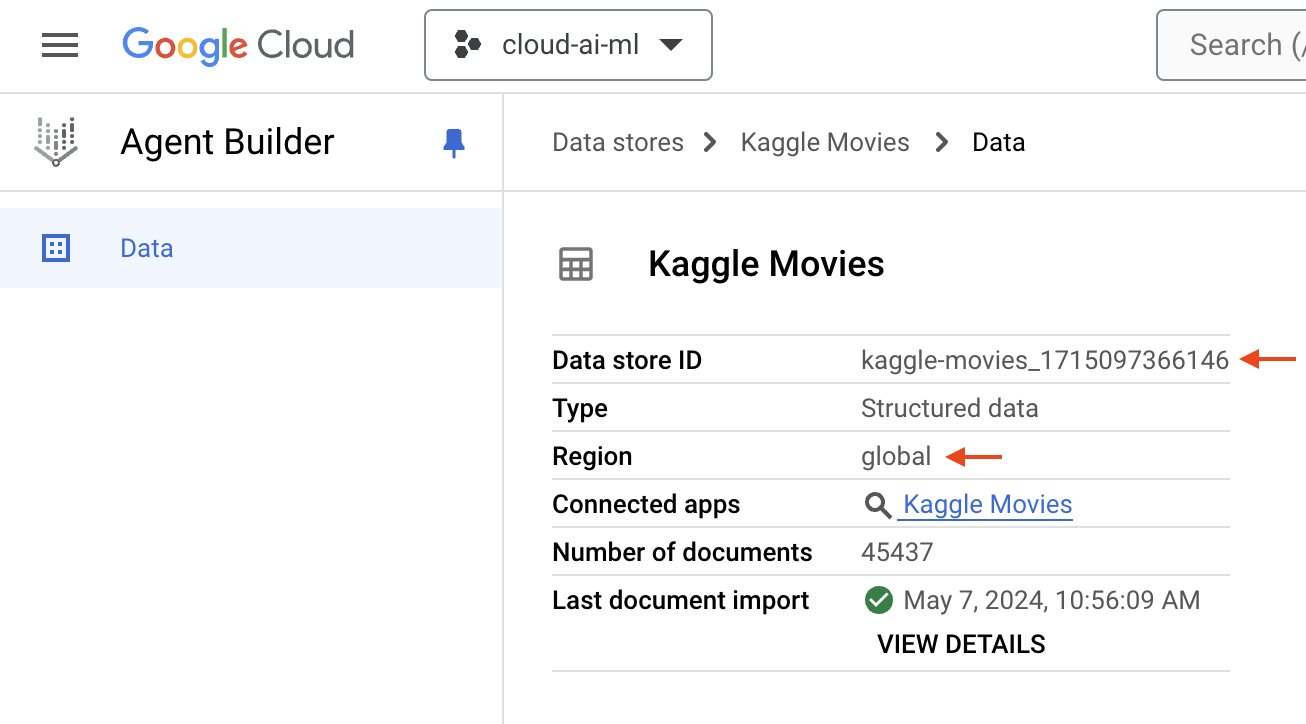
DATA_STORE_ID = "[your-data-store-id]"  # @param {type:"string"}
LOCATION_ID = "global"  # @param {type:"string"}
Define Python functions as tools
The second component of your agent involves Python functions as tools, which will enable the Gemini model to interact with external systems, databases, document stores, and other APIs so that the model can get the most up-to-date information or take action with those systems.
In this example, you'll define a function that sends a query to Vertex AI Search and returns relevant records from the data store that you created in the previous section:
def search_kaggle_movies(query: str) -> str:
    """Search across records in the Kaggle Movies data set."""
    from langchain_google_community import VertexAISearchRetriever

    retriever = VertexAISearchRetriever(
        project_id=PROJECT_ID,
        data_store_id=DATA_STORE_ID,
        location_id=LOCATION_ID,
        engine_data_type=1,
        max_documents=10,
    )

    result = str(retriever.invoke(query))
    return result
Now you can test your search function with sample input to ensure that it's working as expected:
search_kaggle_movies("space exploration")Define agent
The third component of your agent involves adding a reasoning layer, which helps your agent use the tools that you provided to help the end user achieve a higher-level goal.
If you were to use Gemini and Function Calling on their own without a reasoning layer, you would need to handle the process of calling functions and APIs in your application code, and you would need to implement retries and additional logic to ensure that your function calling code is resilient to failures and malformed requests.
Define the prompt template and initialize the chat session history:
# Define prompt template
prompt = {
    "history": lambda x: x["history"],
    "input": lambda x: x["input"],
    "agent_scratchpad": (lambda x: format_to_tool_messages(x["intermediate_steps"])),
} | prompts.ChatPromptTemplate.from_messages(
    [
        prompts.MessagesPlaceholder(variable_name="history"),
        ("user", "{input}"),
        prompts.MessagesPlaceholder(variable_name="agent_scratchpad"),
    ]
)

# Initialize session history
store = {}


def get_session_history(session_id: str):
    if session_id not in store:
        store[session_id] = ChatMessageHistory()
    return store[session_id]
Now you'll use the LangChain agent template provided in the Vertex AI SDK for Agent Engine, which brings together the model, tools, and reasoning that you've built up so far:
agent = LangchainAgent(
    prompt=prompt,
    model=model,
    chat_history=get_session_history,
    model_kwargs={"temperature": 0},
    tools=[search_kaggle_movies],
    agent_executor_kwargs={"return_intermediate_steps": True},
)
Test your agent locally
Now you can test the model and agent behavior to ensure that it's working as expected before you deploy it:
response = agent.query(
    input="Tell me about movies featuring robots",
    config={"configurable": {"session_id": "demo"}},
)

display(Markdown(response["output"]))
Output
<IPython.core.display.Markdown object>
Deploy your agent on Vertex AI
Now that you've tested your agent locally, you're ready to deploy it to Agent Engine in Vertex AI. This will make your agent accessible remotely and allow you to integrate it into larger systems or provide it as a service.
client = vertexai.Client(project=PROJECT_ID, location=LOCATION)

remote_agent = client.agent_engines.create(
    agent=agent,
    config={
        "staging_bucket": STAGING_BUCKET,
        "requirements": [
            "google-cloud-aiplatform[agent_engines,langchain]",
            "langchain-google-community",
            "google-cloud-discoveryengine",
        ],
    },
)
Grant Discovery Engine Editor access to Agent Engine service account
Before you send queries to your remote agent, you'll need to grant the Discovery Engine Editor role to the Agent Engine service account.
After you've completed this step, you remote agent will be able to retrieve documents from the data store that you created in Vertex AI Search:
# Retrieve the project number associated with your project ID
service = discovery.build("cloudresourcemanager", "v1")
request = service.projects().get(projectId=PROJECT_ID)
response = request.execute()
project_number = response["projectNumber"]
project_number# Add a new role binding to the IAM policy
!gcloud projects add-iam-policy-binding {PROJECT_ID} \
--member=serviceAccount:service-{project_number}@gcp-sa-aiplatform-re.iam.gserviceaccount.com \
--role=roles/discoveryengine.editorTest your remotely deployed agent
With your conversational search agent deployed, you can send prompts to test that it's working as expected and that it can retrieve movie data from your Vertex AI Search data store:
response = remote_agent.query(
    input="Tell me about movies featuring robots",
    config={"configurable": {"session_id": "demo"}},
)

display(Markdown(response["output"]))
Output
<IPython.core.display.Markdown object>
response = remote_agent.query(
    input="Tell me more about the movie I, Robot",
    config={"configurable": {"session_id": "demo"}},
)

display(Markdown(response["output"]))
Output
<IPython.core.display.Markdown object>
response = remote_agent.query(
    input="Which of those robot movies are comedies?",
    config={"configurable": {"session_id": "demo"}},
)

display(Markdown(response["output"]))
Output
<IPython.core.display.Markdown object>
Querying your deployed agent
You've now deployed your Agent Engine agent and can interact with it in multiple ways, both within this notebook and from other applications or environments. The primary methods for accessing your deployed agent are via the Python client library or through REST API calls. Here's an overview of both methods:
Method 1: Reusing within this notebook or another Python environment
You can directly reuse and query the remote_agent instance you created in this notebook.
Or, you can instantiate a new instance in another notebook or Python script. To do this, you'll need to retrieve your deployed agent's resource name that uniquely identifies your agent, which is a string that includes the project, location, and Agent Engine ID. You can retrieve it by running the following code in the notebook or environment where you created your agent:
remote_agent.api_resource.nameUse the resource name to load the agent in your other notebook or Python script, then query the remote agent as usual:
# from vertexai import agent_engines

# client = vertexai.Client(project=PROJECT_ID, location=LOCATION)
# AGENT_ENGINE_RESOURCE_NAME = "YOUR_AGENT_ENGINE_RESOURCE_NAME"  # Replace with the resource name of your deployed Agent Engine

# remote_agent = client.agent_engines.get(name=AGENT_ENGINE_RESOURCE_NAME)
# response = remote_agent.query(input="List some sci-fi movies from the 1990s")
Method 2: Accessing from other environments via REST API
Beyond the Python client library, your deployed Vertex AI agent can be queried using REST API calls, including:
- Python: You can use Python's
requestslibrary or similar tools to make HTTP calls to the Vertex AI REST API. - cURL: A command-line tool, cURL allows you to send HTTP requests directly. This is useful for testing and debugging.
- Other Programming Languages: If you prefer a different language for your application, you can use its native HTTP client library to make REST API calls.
In summary, you have access to your deployed Agent Engine agent through the Python client library within Python environments, and more universally through its REST API via tools and programming languages of your choosing.
Cleaning up
After you've finished experimenting, it's a good practice to clean up your cloud resources. You can delete the deployed Agent Engine instance and optionally remove the staging bucket to avoid any unexpected charges on your Google Cloud account.
# Delete the deployed agent
client.agent_engines.delete(name=remote_agent.api_resource.name)

# Optionally, delete the staging bucket
# from google.cloud import storage
# storage.Client().bucket(STAGING_BUCKET.replace("gs://", "")).delete(force=True)