
Chapter 03
Get started with Memory Bank on ADK
# Copyright 2025 Google LLC
#
# Licensed under the Apache License, Version 2.0 (the "License");
# you may not use this file except in compliance with the License.
# You may obtain a copy of the License at
#
#     https://www.apache.org/licenses/LICENSE-2.0
#
# Unless required by applicable law or agreed to in writing, software
# distributed under the License is distributed on an "AS IS" BASIS,
# WITHOUT WARRANTIES OR CONDITIONS OF ANY KIND, either express or implied.
# See the License for the specific language governing permissions and
# limitations under the License.
Get started with Memory Bank on ADK
| Authors |
|---|
| Kimberly Milam |
| Christina Zhu |
Overview
This tutorial demonstrates how to build ADK agents with Memory, including both InMemoryMemoryService and VertexAiMemoryBankService.
This tutorial will cover:
- Comparing
InMemoryMemoryServicevs.VertexAiMemoryBankService. - Generating memories with ADK and Agent Engine Memory Bank.
- Retrieving memories with ADK and Agent Engine Memory Bank.
- Customizing your Memory Bank instance's behavior.
💡 Running in a standard Python script instead of a Notebook?
ADK relies on asynchronous functions. While Jupyter notebooks allow top-level
await, standard Python.pyscripts require you to wrap your async calls in an async function and run them usingasyncio.run(). For more info, see the ADK Memory Documentation and the ADK Event Loop Guide.
Get started
Install Google Gen AI SDK and other required packages
%pip install google-adk google-cloud-aiplatform --upgrade --quietAuthenticate your notebook environment (Colab only)
If you're running this notebook on Google Colab, run the cell below to authenticate your environment.
import sys

if "google.colab" in sys.modules:
    from google.colab import auth

    auth.authenticate_user()
Set Google Cloud project information
To get started using Agent Platform, you must have an existing Google Cloud project and enable the Agent Platform API.
Learn more about setting up a project and a development environment.
# Use the environment variable if the user doesn't provide Project ID.
import os

import vertexai

# fmt: off
PROJECT = "[your-project-id]"  # @param {type: "string", placeholder: "[your-project-id]", isTemplate: true}
# fmt: on
if not PROJECT or PROJECT == "[your-project-id]":
    PROJECT = str(os.environ.get("GOOGLE_CLOUD_PROJECT"))

LOCATION = os.environ.get("GOOGLE_CLOUD_REGION", "us-central1")

client = vertexai.Client(project=PROJECT, location=LOCATION)

# Set environment variables for ADK.
os.environ["GOOGLE_GENAI_USE_VERTEXAI"] = "TRUE"
os.environ["GOOGLE_CLOUD_PROJECT"] = PROJECT
os.environ["GOOGLE_CLOUD_LOCATION"] = LOCATION
(Optional) Set up logging
To surface ADK logs in your notebook, you may need to configure the logging level of ADK's logger.
import logging
import sys

# Set up a general handler for all logs to be printed in your Colab output.
# We'll set the overall level to INFO.
logging.basicConfig(
    level=logging.INFO,
    format="%(asctime)s - %(name)s - %(levelname)s - %(message)s",
    stream=sys.stdout,
)

# Get the specific logger used by ADK.
adk_logger = logging.getLogger("google_adk")

# Set its level to DEBUG to ensure you capture ALL messages from the SDK,
# even if the general level is higher (like INFO).
adk_logger.setLevel(logging.DEBUG)
Define a simple agent
The ADK Runner defines what session service is used by the agent. The session service is responsible for saving the conversation history.
In this example, we're using the in-memory session service (InMemorySessionService). However, you can use any session service with Memory.
If you want to use Google's pre-built Memory tools, you can provide a Memory service to the Runner as well. In this example, we'll start by directly invoking memory so that we can compare different services. So, we're not directly setting memory_service in the Runner.
from google.adk.agents import LlmAgent
from google.adk.runners import Runner
from google.adk.sessions import InMemorySessionService
from google.genai.types import Content, Part

APP_NAME = "memory_example_app"
MODEL = "gemini-2.5-flash"

agent = LlmAgent(
    model=MODEL,
    name="Generic_QA_Agent",
    instruction="Answer the user's questions",
)

session_service = InMemorySessionService()

runner = Runner(agent=agent, app_name=APP_NAME, session_service=session_service)


async def call_agent(query, session, user_id):
    content = Content(role="user", parts=[Part(text=query)])
    events = runner.run_async(user_id=user_id, session_id=session, new_message=content)

    async for event in events:
        if event.is_final_response():
            final_response = event.content.parts[0].text
            print("Agent Response: ", final_response)
Introduction to ADK Memory Service
ADK memory services offer an interface for creating and searching for memories. The BaseMemoryService defines the interface for managing this searchable, long-term knowledge store. Its primary responsibilities are:
- Ingesting Information: Taking events or sessions and adding relevant information to the long-term knowledge store.
add_events_to_memory(Recommended): Takes a subset of events (such as the latest conversation turns) and adds them to the memory bank. This is highly recommended for production agents as it allows streaming and incremental processing of events as they occur, rather than sending the entire session multiple times.add_session_to_memory: Takes the contents of a (usually completed) Session and adds relevant information to the store. This is best used at the end of a session to minimize how many times a single event is re-processed.
- Searching Information (
search_memory): Allowing an agent (typically via a Tool) to query the knowledge store and retrieve relevant snippets or context based on a search query.
In this colab, we'll cover two options:
InMemoryMemoryService: An in-memory service that allows you to search your conversation history to retrieve the raw dialogue using basic keyword matching.VertexAiMemoryBankService: A remote service that remotely generates memories for "meaningful" information from user conversation.
You can also interact directly with Memory Bank by using the Agent Engine SDK.
InMemoryMemoryService
InMemoryMemoryService persists all information in-memory. The events are not condensed, and information is not extracted from them.
from google.adk.memory import InMemoryMemoryService

in_memory_service = InMemoryMemoryService()
VertexAiMemoryBankService
Memory Bank will only persist information that's meaningful for future interactions. VertexAiMemoryBankService provides a built-in integration between Memory Bank and ADK.
To get started with Memory Bank, you need to first create an Agent Engine. This only takes a few seconds.
If you don't have a Google Cloud project, you can use Vertex in Express mode, which only requires an API key.
import vertexai
from google.adk.memory import VertexAiMemoryBankService

client = vertexai.Client(project=PROJECT, location=LOCATION)

agent_engine = client.agent_engines.create(
    config={
        "context_spec": {
            "memory_bank_config": {
                "generation_config": {
                    "model": f"projects/{PROJECT}/locations/{LOCATION}/publishers/google/models/gemini-2.5-flash"
                }
            }
        }
    }
)

memory_bank_service = VertexAiMemoryBankService(
    agent_engine_id=agent_engine.api_resource.name.split("/")[-1],
    project=PROJECT,
    location=LOCATION,
)
Generating Memories
Memories will be generated from your conversation history stored in the Session object. The ADK memory services support both add_session_to_memory and add_events_to_memory to trigger memory generation.
add_events_to_memory(Recommended): Stream a subset of events incrementally as they occur. This is preferred for production use cases to avoid transferring and re-processing the entire session multiple times.add_session_to_memory: Process the entire session history. This is typically used at the end of a session.
The exact behavior depends on which service you use:
-
InMemoryMemoryServicepersists all information, including the raw dialogue. -
VertexAiMemoryBankServiceonly persists meaningful information. Not all conversations will result in generated memories. Additionally, the information will be condensed to individual, self-contained memories.
In this example, we create two sessions:
chit_chat_session, which is a conversation that contains events that may not be meaningful for future interactions.recommendations_session, which is a conversation about looking for birthday presents for a family member. It includes implicit information that may be helpful for future conversations.
⚠️ Note for standard Python scripts: The following steps use
await. Remember to wrap these async statements inside anasync deffunction and execute withasyncio.run()if you're using standard Python.
USER_ID = "My User"

chit_chat_session = await session_service.create_session(
    app_name=APP_NAME, user_id=USER_ID
)

await call_agent(
    "what types of questions do you answer", chit_chat_session.id, user_id=USER_ID
)
# Refresh session object.
chit_chat_session = await session_service.get_session(
    app_name=APP_NAME, user_id=USER_ID, session_id=chit_chat_session.id
)recommendations_session = await session_service.create_session(
app_name=APP_NAME, user_id=USER_ID
)
await call_agent(
"I have a three year old niece. What recommendations do you have for birthday presents?",
recommendations_session.id,
user_id=USER_ID,
)
await call_agent(
"I like the idea of a bike. Are there any age appropriate options?",
recommendations_session.id,
user_id=USER_ID,
)
recommendations_session = await session_service.get_session(
app_name=APP_NAME, user_id=USER_ID, session_id=recommendations_session.id
)InMemoryMemoryService
First, let's see what memories are extracted from the conversation using InMemoryMemoryService and add_events_to_memory.
The memories include the raw dialogue of the conversation.
await in_memory_service.add_events_to_memory(
    app_name=APP_NAME,
    user_id=USER_ID,
    events=chit_chat_session.events,
)
await in_memory_service.add_events_to_memory(
    app_name=APP_NAME,
    user_id=USER_ID,
    events=recommendations_session.events,
)# Peek at the memories.
in_memory_service._session_eventsawait in_memory_service.search_memory(app_name=APP_NAME, user_id=USER_ID, query="test")await in_memory_service.search_memory(
app_name=APP_NAME,
user_id=USER_ID,
query="what should I get my mom for mother's day",
)Memory Bank via VertexAiMemoryBankService
Now, let's use Memory Bank to generate and store memories. Unlike InMemoryMemoryService, only content that's meaningful interactions will be persisted. If there's no meaningful content, the add_events_to_memory call will be a no-op; memories are not generated.
Memory generation happens in the background. It's a non-blocking operation, so add_events_to_memory may complete before memories are actually generated in the background. If you want memory generation to be a blocking operation, use the Agent Engine SDK:
client.agent_engines.memories.generate(
    ...,
    config={
        # Default value is True.
        "wait_for_completion": True
    }
)
There are two key operations that Memory Bank performs under-the-hood with memory generation:
- Extraction: Extracts information about the user from their conversations with the agent. Only information that matches at least one of your instance's memory topics will be persisted.
- Consolidation: Identifies if existing memories with the same scope should be deleted or updated based on the extracted information. Memory Bank checks that new memories are not duplicative or contradictory before merging them with existing memories. If existing memories don't overlap with the new information, a new memory will be created.
ADK add_events_to_memory
await memory_bank_service.add_events_to_memory(
    app_name=APP_NAME,
    user_id=USER_ID,
    events=chit_chat_session.events,
)
await memory_bank_service.add_events_to_memory(
    app_name=APP_NAME,
    user_id=USER_ID,
    events=recommendations_session.events,
)
If you run this immediately after add_events_to_memory, there may be no memories printed. add_events_to_memory is a non-blocking function and memory generation can take a few seconds to run.
await memory_bank_service.search_memory(
    app_name=APP_NAME,
    user_id=USER_ID,
    query="What should I get my mom for mother's day",
)
Agent Engine SDK GenerateMemories
If I want to interact directly with Memory Bank, I can use the Agent Engine SDK. For example, I can use RetrieveMemories to retrieve my memories with or without similarity search.
Memories are isolated by their scope, which is an arbitrary dictionary. VertexAiMemoryBankService uses the scope keys app_name and user_id. app_name is set by your Runner, and user_id is set when creating your Session.
response = client.agent_engines.memories.retrieve(
    name=agent_engine.api_resource.name,
    scope={"app_name": APP_NAME, "user_id": USER_ID},
)
list(response)
You can also use Retrievememories to retrieve memories using similarity search.
response = client.agent_engines.memories.retrieve(
    name=agent_engine.api_resource.name,
    scope={"app_name": APP_NAME, "user_id": USER_ID},
    similarity_search_params={
        "search_query": "what should I get my niece for her birthday?"
    },
)
list(response)
Memory Bank uses a process called "consolidation" to ensure that we do not upload duplicative or contradictory information for the same scope.
import pprint

operation = client.agent_engines.memories.generate(
    name=agent_engine.api_resource.name,
    scope={"app_name": APP_NAME, "user_id": USER_ID},
    direct_contents_source={
        "events": [
            {
                "content": {
                    "role": "user",
                    "parts": [
                        {
                            "text": "I like the idea of getting my niece a bike for her third birthday"
                        }
                    ],
                }
            }
        ]
    },
)
print("***OPERATION RESPONSE***")
pprint.pprint(operation)

print("\n***GENERATED MEMORIES***")
for generated_memory in operation.response.generated_memories:
    pprint.pprint(client.agent_engines.memories.get(name=generated_memory.memory.name))
What if your agent extracted memories that you want to combine with your existing memories? You can also use GenerateMemories to consolidate pre-extracted facts for the same scope documenation.
Memory Bank already contains memories on this topic. So, the relevant existing memories will be updated rather than creating a new, duplicative memory.
operation = client.agent_engines.memories.generate(
    name=agent_engine.api_resource.name,
    scope={"app_name": APP_NAME, "user_id": USER_ID},
    direct_memories_source={"direct_memories": [{"fact": "I got my niece a red bike"}]},
)

print("***OPERATION RESPONSE***")
pprint.pprint(operation)

print("\n***GENERATED MEMORIES***")
for generated_memory in operation.response.generated_memories:
    if generated_memory.action != "DELETED":
        pprint.pprint(
            client.agent_engines.memories.get(name=generated_memory.memory.name)
        )
Automate with Callbacks
To automate the triggering of memory generation, you can implement a callback to generate memories after every turn. Using the built-in helper methods on the CallbackContext, you can easily trigger memory generation without having to access the memory service or the client directly.
from google.adk.tools.preload_memory_tool import PreloadMemoryTool

async def auto_save_session_to_memory_callback(callback_context):
    # Use the built-in add_session_to_memory method on callback_context
    # to automatically save the entire session.
    await callback_context.add_session_to_memory()
    print("\n****Triggered memory generation****\n")


agent = LlmAgent(
    model=MODEL,
    name="Generic_QA_Agent",
    instruction="Answer the user's questions",
    tools=[PreloadMemoryTool()],
    after_agent_callback=auto_save_session_to_memory_callback,
)

runner = Runner(
    agent=agent,
    app_name=APP_NAME,
    session_service=session_service,
    memory_service=memory_bank_service,
)session = await session_service.create_session(app_name=APP_NAME, user_id=USER_ID)
await call_agent(
"What christmas present recommendations do you have for my niece?",
session.id,
user_id=USER_ID,
)
await call_agent(
"I think I'll get her a doll. What types are good for her age?",
session.id,
user_id=USER_ID,
)response = client.agent_engines.memories.retrieve(
name=agent_engine.api_resource.name,
scope={"app_name": APP_NAME, "user_id": USER_ID},
similarity_search_params={
"search_query": "What was I thinking about getting my niece for Christmas?"
},
)
list(response)The prior example used the entire Session to generate memories. However, this can be costly as the size of the session increases because the entire conversation history is transferred and re-processed multiple times.
Instead, you can use add_events_to_memory to stream events incrementally as they occur. This is the recommended approach for production agents. We can update our callback to use the built-in callback_context.add_events_to_memory method, sending only the latest events (for example, the last few events in the session) to the Memory Bank.
from google.adk.tools.preload_memory_tool import PreloadMemoryTool

async def auto_save_user_turn_to_memory_callback(callback_context):
    # Use the built-in add_events_to_memory method on callback_context
    # to incrementally stream the most recent events in the session.
    await callback_context.add_events_to_memory(
        events=callback_context.session.events[-5:-1]
    )
    print("\n****Triggered memory generation****\n")


agent = LlmAgent(
    model=MODEL,
    name="Generic_QA_Agent",
    instruction="Answer the user's questions",
    tools=[PreloadMemoryTool()],
    after_agent_callback=auto_save_user_turn_to_memory_callback,
)

runner = Runner(
    agent=agent,
    app_name=APP_NAME,
    session_service=session_service,
    memory_service=memory_bank_service,
)await call_agent(
"I think I'll get her a doll. What types are good for her age?",
session.id,
user_id=USER_ID,
)Using Memory in your agent
Now, let's link our agent to Memory, so that memories can be fetched by your agent and used for inference. This allows your agent to remember information from prior sessions in a new, empty session.
You can use ADK's built-in tools to fetch memories and incorporate them in the prompt. When using the built-in tools, it's important to provide both a memory tool when creating your Agent and a memory service when defining your Runner.
adk.PreloadMemoryTool
The PreloadMemoryTool always retrieves memories at the start of each turn and includes the memories in the system instruction.
Under the hood, it invokes memory_service.search_memory for the given User and App Name. Memory is invoked before the LLM is called, so there will not be an associated tool call logged for memory.
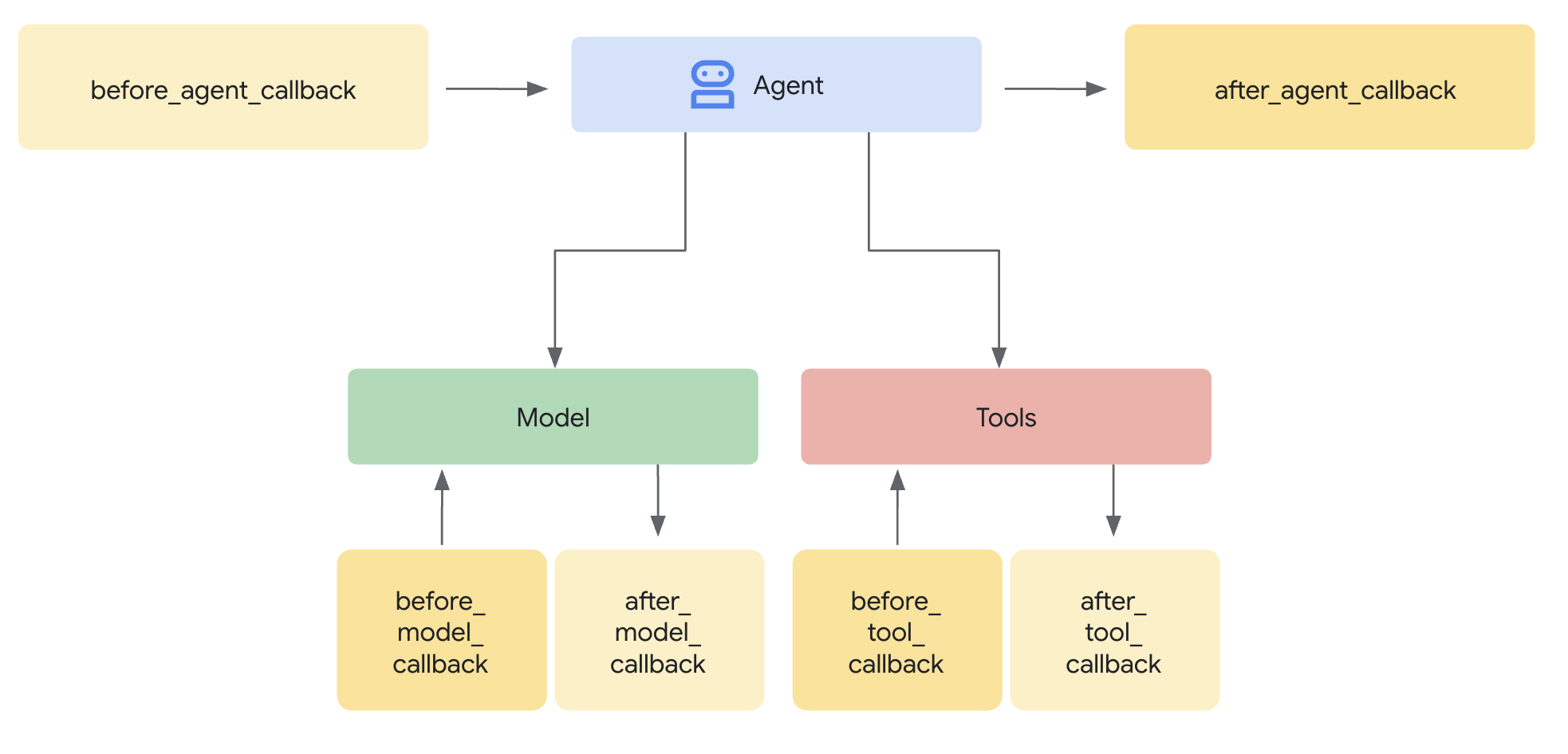
We're going to use a callback to print out the System Instructions. Since we use before_model_callback, the callback executes right before the model is called.
from google.adk.tools.preload_memory_tool import PreloadMemoryTool

def log_system_instructions(callback_context, llm_request):
    """A callback to print the LLM request."""
    print(
        f"\n*System Instruction*:\n{llm_request.config.system_instruction}\n*********\n"
    )


agent = LlmAgent(
    model=MODEL,
    name="Generic_QA_Agent",
    instruction="Answer the user's questions",
    tools=[PreloadMemoryTool()],
    before_model_callback=log_system_instructions,
)

runner = Runner(
    agent=agent,
    app_name=APP_NAME,
    session_service=session_service,
    memory_service=memory_bank_service,
)
This conversation uses a new session, so it doesn't have access to the user's conversation history without using memory.
Since we're using PreloadMemoryTool, the retrieved memories will be appended to the System Instructions.
session = await session_service.create_session(app_name=APP_NAME, user_id=USER_ID)

await call_agent(
    "Can you remind me what I got my niece for her christmas?",
    session.id,
    user_id=USER_ID,
)
adk.LoadMemoryTool
Now, let's use LoadMemoryTool. Unlike PreloadMemoryTool, this tool acts like a standard tool. Your agent needs to decide whether the tool should be invoked.
from google.adk.tools.load_memory_tool import LoadMemoryTool

def log_tool_call(tool, args, tool_response, **kwargs):
    """A callback to print the LLM request."""
    print(f"\n*Tool*:\n{tool}")
    print(f"\n*Tool call*:\n{args}")
    print(f"\n*Tool response*:\n{tool_response}\n*********\n")


agent = LlmAgent(
    model=MODEL,
    name="Generic_QA_Agent",
    instruction="Answer the user's questions",
    tools=[LoadMemoryTool()],
    before_model_callback=log_system_instructions,
    after_tool_callback=log_tool_call,
)

runner = Runner(
    agent=agent,
    app_name=APP_NAME,
    session_service=session_service,
    memory_service=memory_bank_service,
)session = await session_service.create_session(app_name=APP_NAME, user_id=USER_ID)
await call_agent(
"Can you remind me what I got my niece for her christmas?",
session.id,
user_id=USER_ID,
)If the agent decides that Memory is not helpful for a given query, the Memory tool will not be invoked.
session = await session_service.create_session(app_name=APP_NAME, user_id=USER_ID)

await call_agent("Hi!", session.id, user_id=USER_ID)
Custom callback to retrieve memories
If you want more control over how memories are retrieved, you can create your own custom callback.
For example, you can use the Agent Engine SDK within the callback to retrieve memories without similarity search. This is lower latency than using similarity search.
You can also customize your scope rather than using the default "app_name" and "user_id" scope keys used by ADK's memory service.
def retrieve_memories_callback(callback_context, llm_request):
    user_id = callback_context._invocation_context.user_id

    response = client.agent_engines.memories.retrieve(
        name=agent_engine.api_resource.name,
        # Unlike the ADK Memory Service, this does not use App Name in the scope.
        scope={"user_id": user_id},
    )
    memories = [f"* {memory.memory.fact}" for memory in list(response)]
    if not memories:
        # No memories to add to System Instructions.
        return
    # Append formatted memories to the System Instructions
    llm_request.config.system_instruction += (
        "\nHere is information that you have about the user:\n"
    )
    llm_request.config.system_instruction += "\n".join(memories)


def log_tool_call(tool, args, tool_response, **kwargs):
    """A callback to print the LLM request."""
    print(f"\n*Tool*:\n{tool}")
    print(f"\n*Tool call*:\n{args}")
    print(f"\n*Tool response*:\n{log_tool_call}\n*********\n")


agent = LlmAgent(
    model=MODEL,
    name="Generic_QA_Agent",
    instruction="Answer the user's questions",
    before_model_callback=retrieve_memories_callback,
)

runner = Runner(
    agent=agent,
    app_name=APP_NAME,
    session_service=session_service,
    memory_service=memory_bank_service,
)
Since we're using a different scope than the ADK Memory Service, we don't have access to the prior memories. Memories are isolated by their scope dictionary.
session = await session_service.create_session(app_name=APP_NAME, user_id=USER_ID)

await call_agent("Hi!", session.id, user_id=USER_ID)
Let's first generate memories for our new scope.
client.agent_engines.memories.generate(
    scope={"user_id": USER_ID},
    name=agent_engine.api_resource.name,
    direct_contents_source={
        "events": [
            {"content": {"role": "user", "parts": [{"text": "I have four nieces!"}]}}
        ]
    },
)await call_agent("What information do you know about me?", session.id, user_id=USER_ID)Customize your Memory Bank's behavior
So far, we've used Memory Bank with it's default settings. Now, let's customize some configurations. The configuration is set when creating or updating your Agent Engine.
Customizing Memory Extraction
By default, Memory Bank considers memories that fit the following topics to be meaningful:
- Personal information (
USER_PERSONAL_INFO): Significant personal information about the user, like names, relationships, hobbies, and important dates. For example, "I work at Google" or "My wedding anniversary is on December 31". - User preferences (
USER_PREFERENCES): Stated or implied likes, dislikes, preferred styles, or patterns. For example, "I prefer the middle seat." - Key conversation events and task outcomes (
KEY_CONVERSATION_DETAILS): Important milestones or conclusions within the dialogue. For example, "I booked plane tickets for a round trip between JFK and SFO. I leave on June 1, 2025 and return on June 7, 2025." - Explicit remember / forget instructions (
EXPLICIT_INSTRUCTIONS): Information that the user explicitly asks the agent to remember or forget. For example, if the user says "Remember that I primarily use Python," Memory Bank generates a memory such as "I primarily use Python."
These are managed topics where Memory Bank manages their definition. If you want to use a subset of these topics or use custom topics, you can provide a "CustomizationConfig" to customize what information Memory Bank should consider meaningful to persist.
Managed Topics
We're going to update our Memory Bank to only extract user preferences.
This will take affect for all requests to Memory Bank, regardless of whether you use ADK or Agent Engine SDK.
user_preferences_config = {
    "scope_keys": ["user_id"],
    "memory_topics": [
        {"managed_memory_topic": {"managed_topic_enum": "USER_PREFERENCES"}}
    ],
}


client.agent_engines.update(
    name=agent_engine.api_resource.name,
    config={
        "context_spec": {
            "memory_bank_config": {
                "customization_configs": [user_preferences_config],
            }
        }
    },
)
Memories that fit the USER_PREFERENCES category will be persisted.
client.agent_engines.memories.generate(
    scope={"user_id": USER_ID},
    name=agent_engine.api_resource.name,
    direct_contents_source={
        "events": [
            {
                "content": {
                    "role": "user",
                    "parts": [{"text": "I prefer the aisle seat"}],
                }
            }
        ]
    },
)
Memories that don't fit USER_PREFERENCES won't be persisted.
client.agent_engines.memories.generate(
    scope={"user_id": USER_ID},
    name=agent_engine.api_resource.name,
    direct_contents_source={
        "events": [
            {
                "content": {
                    "role": "user",
                    "parts": [{"text": "I'm going to get my niece a red bike"}],
                }
            }
        ]
    },
)
Custom Topics
Alternatively, you can define your own custom topics where you define your own labels, descriptions, and examples.
from vertexai.types import MemoryBankCustomizationConfig as CustomizationConfig
from vertexai.types import (
    MemoryBankCustomizationConfigGenerateMemoriesExample as GenerateMemoriesExample,
)
from vertexai.types import (
    MemoryBankCustomizationConfigGenerateMemoriesExampleConversationSource as ConversationSource,
)
from vertexai.types import (
    MemoryBankCustomizationConfigGenerateMemoriesExampleConversationSourceEvent as ConversationSourceEvent,
)
from vertexai.types import (
    MemoryBankCustomizationConfigGenerateMemoriesExampleGeneratedMemory as ExampleGeneratedMemory,
)
from vertexai.types import MemoryBankCustomizationConfigMemoryTopic as MemoryTopic
from vertexai.types import (
    MemoryBankCustomizationConfigMemoryTopicCustomMemoryTopic as CustomMemoryTopic,
)

memory_topic = MemoryTopic(
    custom_memory_topic=CustomMemoryTopic(
        label="business_feedback",
        description="""Specific user feedback about their experience at
the coffee shop. This includes opinions on drinks, food, pastries, ambiance,
staff friendliness, service speed, cleanliness, and any suggestions for
improvement.""",
    )
)


example = GenerateMemoriesExample(
    conversation_source=ConversationSource(
        events=[
            ConversationSourceEvent(
                content=Content(
                    role="model",
                    parts=[
                        Part(
                            text="Welcome back to The Daily Grind! We'd love to hear your feedback on your visit."
                        )
                    ],
                )
            ),
            ConversationSourceEvent(
                content=Content(
                    role="user",
                    parts=[
                        Part(
                            text="Hey. The drip coffee was a bit lukewarm today, which was a bummer. Also, the music was way too loud, I could barely hear my friend."
                        )
                    ],
                )
            ),
        ]
    ),
    generated_memories=[
        ExampleGeneratedMemory(
            fact="The user reported that the drip coffee was lukewarm."
        ),
        ExampleGeneratedMemory(
            fact="The user felt the music in the shop was too loud."
        ),
    ],
)

noop_example = GenerateMemoriesExample(
    conversation_source=ConversationSource(
        events=[
            ConversationSourceEvent(
                content=Content(
                    role="model",
                    parts=[
                        Part(
                            text="Welcome back to The Daily Grind! We'd love to hear your feedback on your visit."
                        )
                    ],
                )
            ),
            ConversationSourceEvent(
                content=Content(
                    role="user", parts=[Part(text="Thanks for the coffee!")]
                )
            ),
        ]
    ),
    generated_memories=[],
)

client.agent_engines.update(
    name=agent_engine.api_resource.name,
    config={
        "context_spec": {
            "memory_bank_config": {
                "customization_configs": [
                    CustomizationConfig(
                        memory_topics=[memory_topic],
                        generate_memories_examples=[example, noop_example],
                    )
                ],
            }
        }
    },
)client.agent_engines.memories.generate(
scope={"user_id": "123"},
name=agent_engine.api_resource.name,
direct_contents_source={
"events": [
{
"content": {
"role": "user",
"parts": [{"text": "I prefer the aisle seat"}],
}
}
]
},
)import vertexai
client.agent_engines.memories.generate(
scope={"user_id": "123"},
name=agent_engine.api_resource.name,
direct_contents_source={
"events": [
{
"content": {
"role": "user",
"parts": [{"text": "You should have almond milk"}],
}
}
]
},
)list(
client.agent_engines.memories.retrieve(
name=agent_engine.api_resource.name, scope={"user_id": "123"}
)
)Dynamic TTL
You can also configure Memory Bank to automatically set the TTL for any generated or manually created (or updated) memories.
Default TTL
Default TTL applies to all operations that create or update a Memory.
client.agent_engines.update(
    name=agent_engine.api_resource.name,
    config={
        "context_spec": {
            "memory_bank_config": {
                "ttl_config": {
                    # 30 days
                    "default_ttl": f"{60 * 60 * 24 * 30}s"
                }
            }
        }
    },
)response = client.agent_engines.memories.generate(
scope={"user_id": USER_ID},
name=agent_engine.api_resource.name,
direct_contents_source={
"events": [
{"content": {"role": "user", "parts": [{"text": "I have four nieces!"}]}}
]
},
config={"wait_for_completion": True},
)
client.agent_engines.memories.get(
name=response.response.generated_memories[0].memory.name
)Granular TTL
The TTL is calculated based on which operation created or updated the Memory. If not set for a given operation, then the operation won't update the Memory's expiration time.
Parameters include:
create_ttl: Applies to Memories created with CreateMemory operationsgenerate_created_ttl: Applies to Memories created with GenerateMemoriesgenerate_updated_ttl: Applies to Memories updated with GenerateMemories
client.agent_engines.update(
    name=agent_engine.api_resource.name,
    config={
        "context_spec": {
            "memory_bank_config": {
                "ttl_config": {
                    "granular_ttl_config": {
                        # 365 days
                        "generate_created_ttl": f"{24 * 60 * 60 * 365}s",
                    }
                }
            }
        }
    },
)response = client.agent_engines.memories.generate(
scope={"user_id": USER_ID},
name=agent_engine.api_resource.name,
direct_contents_source={
"events": [
{
"content": {
"role": "user",
"parts": [{"text": "Remember that I work at Google!"}],
}
}
]
},
)
client.agent_engines.memories.get(
name=response.response.generated_memories[0].memory.name
)response = client.agent_engines.memories.generate(
scope={"user_id": USER_ID},
name=agent_engine.api_resource.name,
direct_contents_source={
"events": [
{"content": {"role": "user", "parts": [{"text": "I work at Google!"}]}}
]
},
)
client.agent_engines.memories.get(
name=response.response.generated_memories[0].memory.name
)Cleaning up
It's always a best practice in cloud development to clean up resources you no longer need to avoid incurring unexpected costs. This final cell deletes the AgentEngine resources we created throughout this tutorial.
delete_agent_engines = True

agent_engine_name = agent_engine.api_resource.name

if delete_agent_engines:
    # Delete agent engine
    client.agent_engines.delete(name=agent_engine_name, force=True)