
Chapter 41
Combining Semantic & Keyword Search: A Hybrid Search Tutorial with Agent Platform Vector Search
# Copyright 2024 Google LLC
#
# Licensed under the Apache License, Version 2.0 (the "License");
# you may not use this file except in compliance with the License.
# You may obtain a copy of the License at
#
#     https://www.apache.org/licenses/LICENSE-2.0
#
# Unless required by applicable law or agreed to in writing, software
# distributed under the License is distributed on an "AS IS" BASIS,
# WITHOUT WARRANTIES OR CONDITIONS OF ANY KIND, either express or implied.
# See the License for the specific language governing permissions and
# limitations under the License.
Combining Semantic & Keyword Search: A Hybrid Search Tutorial with Agent Platform Vector Search
Vector Search supports hybrid search, a popular architecture pattern in information retrieval (IR) that combines both semantic search and keyword search (also called token-based search). With hybrid search, developers can take advantage of the best of the two approaches, effectively providing higher search quality.
This tutorial explains the concepts of hybrid search, semantic search, and token-based search, and includes examples of how to set up token-based search and hybrid search.
This tutorial takes about 1 - 1.5 hours, mostly on waiting for Vector Search deployments (30 minutes x 2 times).
Why does hybrid search matter?
As described in Overview of Vector Search, semantic search with Vector Search can find items with semantic similarity by using queries.
Embedding models such as Agent Platform embeddings build a vector space as a map of content meanings. Each text or multimodal embedding is a location in the map that represents the meaning of some content. As a simplified example, when an embedding model takes a text that discusses movies for 10%, music for 2%, and actors for 30%, it could represent this text with an embedding [0.1, 0.02, 0.3]. With Vector Search, you can quickly find other embeddings in its neighborhood. This searching by content meaning is called semantic search.

Semantic search with embeddings and vector search can help make IT systems as smart as experienced librarians or shop staff. Embeddings can be used for tying different business data with their meanings; for example, queries and search results; texts and images; user activities and recommended products; English texts and Japanese texts; or sensor data and alerting conditions. With this capability, there's a wide variety of use cases for embeddings.
Why combine semantic search with keyword-based search?
Semantic search doesn't cover all the possible requirements for information retrieval applications, such as Retrieval-Augmented Generation (RAG). Semantic search can only find data that the embedding model can make sense of. For example, queries or datasets with arbitrary product numbers or SKUs, brand new product names that were added recently, and corporate proprietary codenames don't work with semantic search because they aren't included in the training dataset of the embedding model. This is called "out of domain" data.
In such cases, you would need to combine semantic search with keyword-based (also called token-based) search to form a hybrid search. With hybrid search, you can take advantage of both semantic and token-based search to achieve higher search quality.
One of the most popular hybrid search systems is Google Search. The service incorporated semantic search in 2015 with RankBrain model, in addition to its token-based keyword search algorithm. With the introduction of hybrid search, Google Search was able to improve the search quality significantly by addressing the two requirements: search by meaning and search by keyword.
In the past, building a hybrid search engine was a complex task. Just like with Google Search, you have to build and operate two different kinds of search engines (semantic search and token-based search) and merge and rank the results from them. With hybrid search support in Vector Search, you can build your own hybrid search system with a single Vector Search index, customized to your business requirements.
How token-based search works
How does token-based search in Vector Search work? After splitting the text into tokens (such as words or sub-words), you can use popular sparse embedding algorithms such as TF-IDF, BM25, or SPLADE to generate sparse embedding for the text.
A simplified explanation of sparse embeddings is that they are vectors that represent how many times each word or sub-word appears in the text. Typical sparse embeddings don't take semantics of the text into account.
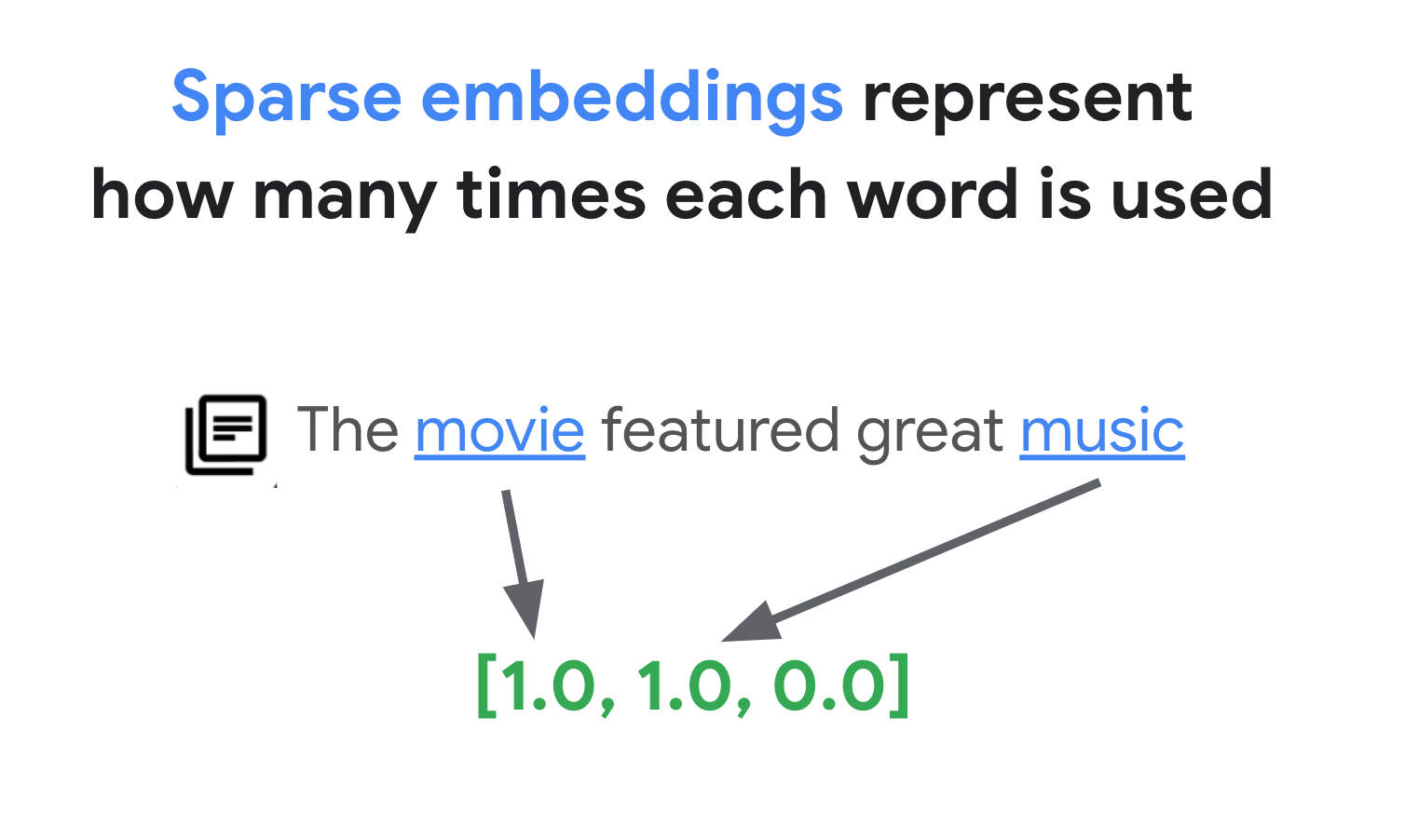
There could be thousands of different words used in texts. Thus, this embedding usually has tens of thousands of dimensions, with only a few dimensions in them having non-zero values. This is why they're called "sparse" embeddings. The majority of their values are zeroes. This sparse embedding space works as a map of keywords, similar to an index of books.
In this sparse embedding space, you can find similar embeddings by looking at the neighborhood of a query embedding. These embeddings are similar in terms of the distribution of the keywords used in their texts.

This is the basic mechanism of the token-based search with sparse embeddings. With hybrid search in Vector Search, you can mix both dense and sparse embeddings into a single vector index and run queries with dense embeddings, sparse embeddings, or both. The result is a combination of semantic search and token-based search results.
Hybrid search also provides shorter query latency compared to a token-based search engine with an inverted index design. Just like vector search for semantic search, each query with dense or sparse embeddings finishes within milliseconds, even with millions or billions of items.
Example: How to use token-based search
To explain how to use token-based search, the following sections include code examples that generate sparse embeddings and build an index with them on Vector Search.
Setup
Let's start setting up the SDK and environment variables.
Install Python SDK
This tutorial uses Agent Platform SDK and Cloud Storage SDK.
%pip install --upgrade --quiet --user google-cloud-aiplatform google-cloud-storage google-genaiAuthenticate your notebook environment (Colab only)
If you're running this notebook on Google Colab, run the cell below to authenticate your environment.
import sys

if "google.colab" in sys.modules:
    from google.colab import auth

    auth.authenticate_user()
Set Google Cloud project information and initialize Agent Platform SDK
To get started using Agent Platform, you must have an existing Google Cloud project and enable the Agent Platform API.
Learn more about setting up a project and a development environment.
# get project ID
PROJECT_ID = ! gcloud config get project
PROJECT_ID = PROJECT_ID[0]
LOCATION = "us-central1"
if PROJECT_ID == "(unset)":
print("Please set the project ID manually below")# define project information
if PROJECT_ID == "(unset)":
PROJECT_ID = "[your-project-id]" # @param {type:"string"}# generate an unique id for this session
from datetime import datetime
UID = datetime.now().strftime("%m%d%H%M")Prepare a sample dataset
The first step is to prepare a data file to build an index for sparse embeddings, based on the data format described in Input data format and structure.
In JSON, the data file looks like this:
{"id": "3", "sparse_embedding": {"values": [0.1, 0.2], "dimensions": [1, 4]}}
{"id": "4", "sparse_embedding": {"values": [-0.4, 0.2, -1.3], "dimensions": [10, 20, 20]}}
Each item should have a sparse_embedding property that has values and dimensions properties. Sparse embeddings have thousands of dimensions with a few non-zero values. This data format works efficiently because it contains the non-zero values only with their positions in the space.
As a sample dataset, we'll use the Google Merch Shop dataset, which has about 200 rows of Google-branded goods.
import pandas as pd

CSV_URL = "https://raw.githubusercontent.com/GoogleCloudPlatform/generative-ai/main/gemini/sample-apps/photo-discovery/ag-web/google_merch_shop_items.csv"

# Load the CSV file into a DataFrame
df = pd.read_csv(CSV_URL)
df["title"]
Output
0                          Google Sticker
1                    Google Cloud Sticker
2                       Android Black Pen
3                   Google Ombre Lime Pen
4                    For Everyone Eco Pen
                      ...
197        Google Recycled Black Backpack
198    Google Cascades Unisex Zip Sweater
199    Google Cascades Womens Zip Sweater
200         Google Cloud Skyline Backpack
201       Google City Black Tote Backpack
Name: title, Length: 202, dtype: object
How to use Token-based Search
With the dataset, we will create sparse embeddings for implementing a token-based search with Vector Search.
Prepare a TF-IDF vectorizer
With this dataset, we'll train a vectorizer, a model that generates sparse embeddings from a text. This example uses TfidfVectorizer in scikit-learn, which is a basic vectorizer that uses the TF-IDF algorithm.
from sklearn.feature_extraction.text import TfidfVectorizer

# Sample Text Data
corpus = df.title.tolist()

# Initialize TfidfVectorizer
vectorizer = TfidfVectorizer()

# Fit and Transform
vectorizer.fit_transform(corpus)
The variable corpus holds a list of the 200 item names, such as "Google Sticker" or "Chrome Dino Pin". Then, the code passes them to the vectorizer by calling the fit_transform() function. With that, the vectorizer gets ready to generate sparse embeddings.
TF-IDF vectorizer tries to give higher weight to signature words in the dataset (such as "Shirts" or "Dino") compared to trivial words (such as "The", "a", or "of"), and counts how many times those signature words are used in the specified document. Each value of a sparse embedding represents a frequency of each word based on the counts. For more information about TF-IDF, see the later section "How do TF-IDF and TfidfVectorizer work?".
In this example, we use the basic word-level tokenization and TF-IDF vectorization for simplicity. In production development, you can choose any other options for tokenizations and vectorizations for generating sparse embeddings based on your requirements. For tokenizers, in many cases subword tokenizers perform well compared to the word-level tokenization and are popular choices. For vectorizers, BM25 is popular as an improved version of TF-IDF. SPLADE is another popular vectorization algorithm that takes some semantics for the sparse embedding.
Get a sparse embedding
To make the vectorizer easier to use with Vector Search, we'll define a wrapper function, get_sparse_embedding():
def get_sparse_embedding(text):
    # Transform Text into TF-IDF Sparse Vector
    tfidf_vector = vectorizer.transform([text])

    # Create Sparse Embedding for the New Text
    values = []
    dims = []
    for i, tfidf_value in enumerate(tfidf_vector.data):
        values.append(float(tfidf_value))
        dims.append(int(tfidf_vector.indices[i]))
    return {"values": values, "dimensions": dims}
This function passes the parameter "text" to the vectorizer to generate a sparse embedding. Then convert it to the {"values": ...., "dimensions": ...} format mentioned earlier for building a Vector Search sparse index.
You can test this function:
text_text = "Chrome Dino Pin"
get_sparse_embedding(text_text)
Output
{'values': [0.6756557405747007, 0.5212913389979028, 0.5212913389979028],
 'dimensions': [157, 48, 33]}
Create an input data file
For this example, we'll generate sparse embeddings for all 200 items.
# create bucket
BUCKET_URI = f"gs://{PROJECT_ID}-vs-hybridsearch-{UID}"
! gsutil mb -l $LOCATION -p $PROJECT_ID $BUCKET_URI
Output
Creating gs://gcp-samples-ic0-vs-hybridsearch-07300053/...
items = []
for i in range(len(df)):
    id = i
    title = df.title[i]
    sparse_embedding = get_sparse_embedding(title)
    items.append({"id": id, "title": title, "sparse_embedding": sparse_embedding})
items[:5]
Output
[{'id': 0,
  'title': 'Google Sticker',
  'sparse_embedding': {'values': [0.933008728540452, 0.359853737603667],
   'dimensions': [191, 78]}},
 {'id': 1,
  'title': 'Google Cloud Sticker',
  'sparse_embedding': {'values': [0.6884926145791601,
    0.26554589800720163,
    0.6748802084233179],
   'dimensions': [191, 78, 37]}},
 {'id': 2,
  'title': 'Android Black Pen',
  'sparse_embedding': {'values': [0.578954308910934,
    0.5468824106727572,
    0.6047574200373373],
   'dimensions': [153, 16, 2]}},
 {'id': 3,
  'title': 'Google Ombre Lime Pen',
  'sparse_embedding': {'values': [0.4417396140901719,
    0.580646486216207,
    0.6623352815578535,
    0.17037530980725205],
   'dimensions': [153, 141, 119, 78]}},
 {'id': 4,
  'title': 'For Everyone Eco Pen',
  'sparse_embedding': {'values': [0.4749050808211265,
    0.5533375082080382,
    0.5533375082080382,
    0.4026169000806076],
   'dimensions': [153, 67, 61, 56]}}]
Then, save them as a JSONL file items.json and upload to a Cloud Storage bucket.
# output as a JSONL file and save to the GCS bucket
with open("items.json", "w") as f:
    for item in items:
        f.write(f"{item}\n")
! gsutil cp items.json $BUCKET_URI
Output
Copying file://items.json [Content-Type=application/json]...
/ [1 files][ 39.9 KiB/ 39.9 KiB]
Operation completed over 1 objects/39.9 KiB.
Create a sparse embedding index in Vector Search
Next, we'll build and deploy a sparse embedding index in Vector Search. This is the same procedure that is documented in the Vector Search quickstart.
# init the aiplatform package
from google.cloud import aiplatform

aiplatform.init(project=PROJECT_ID, location=LOCATION)# create Index (this should finish less than one minute)
my_sparse_index = aiplatform.MatchingEngineIndex.create_tree_ah_index(
display_name=f"vs-tokensearch-index-{UID}",
contents_delta_uri=BUCKET_URI,
dimensions=768,
approximate_neighbors_count=10,
)To use the index, you need to create an index endpoint. It works as a server instance accepting query requests for your index.
# create `IndexEndpoint`
my_index_endpoint = aiplatform.MatchingEngineIndexEndpoint.create(
    display_name=f"vs-hybridsearch-index-endpoint-{UID}", public_endpoint_enabled=True
)
With the index endpoint, deploy the index by specifying a unique deployed index ID.
# deploy the Index to the Index Endpoint (this takes upto 30 minutes)
# Note: for Colab Enterprise, this may output timeout error, but you can ignore it
DEPLOYED_TOKEN_INDEX_ID = f"vs_tokensearch_deployed_{UID}"
my_index_endpoint.deploy_index(
    index=my_sparse_index, deployed_index_id=DEPLOYED_TOKEN_INDEX_ID
)
After waiting for the deployment, we're ready to run a test query. This may take up to 30 minutes.
Run a query with a sparse embedding index
To run a query with a sparse embedding index, you need to create a HybridQuery object to encapsulate the sparse embedding of the query text, like in the following example:
from google.cloud.aiplatform.matching_engine.matching_engine_index_endpoint import (
    HybridQuery,
)

# create HybridQuery
query_text = "Kids"
query_emb = get_sparse_embedding(query_text)
query = HybridQuery(
    sparse_embedding_dimensions=query_emb["dimensions"],
    sparse_embedding_values=query_emb["values"],
)
This example code uses the text Kids for the query. Now, run a query with the HybridQuery object.
# build a query request
response = my_index_endpoint.find_neighbors(
    deployed_index_id=DEPLOYED_TOKEN_INDEX_ID,
    queries=[query],
    num_neighbors=5,
)

# print results
for idx, neighbor in enumerate(response[0]):
    title = df.title[int(neighbor.id)]
    print(f"{title:<40}")
This should provide output like the following:
Google Blue Kids Sunglasses
Google Red Kids Sunglasses
YouTube Kids Coloring Pencils
YouTube Kids Character Sticker Sheet
Out of the 200 items, the result contains the item names that have the keyword Kids.
Example: How to use hybrid search
This example combines token-based search with semantic search to create hybrid search in Vector Search.
How to create hybrid index
To build a hybrid index, each item should have both embedding (for dense embedding) and sparse_embedding:
# get text embedding model
from google import genai
from google.genai.types import EmbedContentConfig

embed_client = genai.Client(
    vertexai=True,
    project=PROJECT_ID,
    location=LOCATION,
)


# wrapper
def get_dense_embedding(text):
    response = embed_client.models.embed_content(
        model="gemini-embedding-001",
        contents=text,
        config=EmbedContentConfig(
            output_dimensionality=768,
        ),
    )
    return response.embeddings[0].values


# test it
get_dense_embedding("Chrome Dino Pin")items = []
for i in range(len(df)):
id = i
title = df.title[i]
dense_embedding = get_dense_embedding(title)
sparse_embedding = get_sparse_embedding(title)
items.append(
{
"id": id,
"title": title,
"embedding": dense_embedding,
"sparse_embedding": sparse_embedding,
}
)
items[0]The get_dense_embedding() function uses gemini-embedding-001 for generating text embedding with 768 dimensions. This generates both dense and sparse embeddings in the following format:
{
  'id': 0,
  'title': 'Google Sticker',
  'embedding':
    [0.022880317643284798,
    -0.03315234184265137,
    ...
    -0.03309667482972145,
    0.04621824622154236],
  'sparse_embedding': {
    'values': [0.933008728540452, 0.359853737603667],
    'dimensions': [191, 78]
  }
}
The rest of the process is the same as the previous example. Upload the JSONL file to the Cloud Storage bucket, create a Vector Search index with the file, and deploy the index to the index endpoint.
# output as a JSONL file and save to the GCS bucket
with open("items.json", "w") as f:
    for item in items:
        f.write(f"{item}\n")
! gsutil cp items.json $BUCKET_URI# create Index (this should finish less than one minute)
my_hybrid_index = aiplatform.MatchingEngineIndex.create_tree_ah_index(
display_name=f"vs-hybridsearch-index-{UID}",
contents_delta_uri=BUCKET_URI,
dimensions=768,
approximate_neighbors_count=10,
)# deploy index
DEPLOYED_HYBRID_INDEX_ID = f"vs_hybridsearch_deployed_{UID}"
my_index_endpoint.deploy_index(
index=my_hybrid_index, deployed_index_id=DEPLOYED_HYBRID_INDEX_ID
)Run a hybrid query
After deploying the hybrid index, you can run a hybrid query:
# create HybridQuery
query_text = "Kids"
query_dense_emb = get_dense_embedding(query_text)
query_sparse_emb = get_sparse_embedding(query_text)
query = HybridQuery(
    dense_embedding=query_dense_emb,
    sparse_embedding_dimensions=query_sparse_emb["dimensions"],
    sparse_embedding_values=query_sparse_emb["values"],
    rrf_ranking_alpha=0.5,
)
For the query text Kids, generate both dense and sparse embeddings for the word, and encapsulate them to the HybridQuery object. The difference from the previous HybridQuery is two additional parameters: dense_embedding and rrf_ranking_alpha.
This time, we'll print distances for each item:
# run a hybrid query
response = my_index_endpoint.find_neighbors(
    deployed_index_id=DEPLOYED_HYBRID_INDEX_ID,
    queries=[query],
    num_neighbors=10,
)

# print results
for idx, neighbor in enumerate(response[0]):
    title = df.title[int(neighbor.id)]
    dense_dist = neighbor.distance if neighbor.distance else 0.0
    sparse_dist = neighbor.sparse_distance if neighbor.sparse_distance else 0.0
    print(f"{title:<40}: dense_dist: {dense_dist:.3f}, sparse_dist: {sparse_dist:.3f}")
In each neighbor object, there's a distance property that has the distance between the query and the item with the dense embedding, and a sparse_distance property that has the distance with the sparse embedding. These values are inverted distances, so a higher value means a shorter distance.
By running a query with HybridQuery, you get the following result:
Google Blue Kids Sunglasses             : dense_dist: 0.677, sparse_dist: 0.606
Google Red Kids Sunglasses              : dense_dist: 0.665, sparse_dist: 0.572
YouTube Kids Coloring Pencils           : dense_dist: 0.655, sparse_dist: 0.478
YouTube Kids Character Sticker Sheet    : dense_dist: 0.644, sparse_dist: 0.468
Google White Classic Youth Tee          : dense_dist: 0.645, sparse_dist: 0.000
Google Doogler Youth Tee                : dense_dist: 0.639, sparse_dist: 0.000
Google Indigo Youth Tee                 : dense_dist: 0.637, sparse_dist: 0.000
Google Black Classic Youth Tee          : dense_dist: 0.632, sparse_dist: 0.000
Chrome Dino Glow-in-the-Dark Youth Tee  : dense_dist: 0.632, sparse_dist: 0.000
Google Bike Youth Tee                   : dense_dist: 0.629, sparse_dist: 0.000
In addition to the token-based search results that have the Kids keyword, there are also semantic search results included. For example, Google White Classic Youth Tee is included because the embedding model knows that Youth and Kids are semantically similar.
To merge the token-based and semantic search results, hybrid search uses Reciprocal Rank Fusion (RRF). For more information about RRF and how to specify the rrf_ranking_alpha parameter, see the later section "What is Reciprocal Rank Fusion?".
Reranking
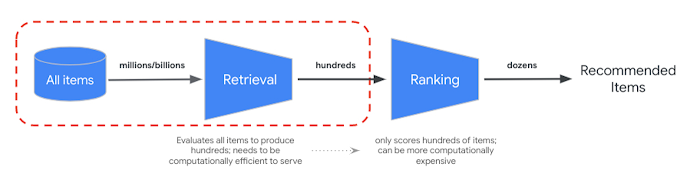
RRF provides a way to merge the ranking from semantic and token-based search results. In many production information retrieval or recommender systems, the results will be going through further precision ranking algorithms - so called reranking. With the combination of the millisecond level fast retrieval with vector search, and precision reranking on the results, you can build multi-stage systems that provide higher search quality or recommendation performance.
Conclusion
In this tutorial, we have learned the concept of hybrid search, how to build vector search index for token-based search with sparse embeddings, and how to combine it with the semantic search with dense embeddings. As we see on the example, hybrid search provides a way to mix the best part of the two approaches, resulting in higher search quality in production systems.
Cleaning up
In case you are using your own Cloud project, not a temporary project on Qwiklab, please make sure to delete all the Indexes, Index Endpoints and Cloud Storage buckets after finishing this tutorial. Otherwise the remaining objects would incur unexpected costs.
# wait for a confirmation
input("Press Enter to delete Index Endpoint, Index and Cloud Storage bucket:")

# delete Index Endpoint
my_index_endpoint.undeploy_all()
my_index_endpoint.delete(force=True)

# delete Indexes
my_sparse_index.delete()
my_hybrid_index.delete()

# delete Cloud Storage bucket
! gsutil rm -r "{BUCKET_URI}"
Start using hybrid search
The following resources can help you get started with using hybrid search in Vector Search.
Hybrid search resources
- Input data format and structure: Input data format for building sparse embedding index
- Query public index to get nearest neighbors: How to run queries with hybrid search
- Reciprocal Rank Fusion outperforms Condorcet and individual Rank Learning Methods: Discussion of the RRF algorithm
Vector Search resources
Additional concepts
The following sections describe TF-IDF and TfidVectorizer, Reciprical Rank Fusion, and the alpha parameter in further detail.
How do TF-IDF and TfidfVectorizer work?
The fit_transform() function executes two important processes of the TF-IDF algorithm:
- Fit: The vectorizer calculates the Inverse Document Frequency (IDF) for each term in the vocabulary. IDF reflects how important a term is across the entire corpus. Rare terms get higher IDF scores:
IDF(t) = log_e(Total number of documents / Number of documents containing term t)- Transform:
- Tokenization: Breaks the documents down into individual terms (words or phrases)
- Term Frequency (TF) Calculation: Counts how often each term appears in each document with:
TF(t, d)** = (Number of times term t appears in document d) / (Total number of terms in document d)- TF-IDF Calculation: Combines the TF for each term with the pre-calculated IDF to create a TF-IDF score. This score represents the importance of a term in a particular document relative to the entire corpus.
TF-IDF(t, d) = TF(t, d) * IDF(t)The TF-IDF vectorizer tries to put higher weight to signature words in the dataset, such as "Shirts" or "Dino", compared to trivial words, such as "The", "a" or "of", and counts how many times those signature words are used in the specified document. Each value of a sparse embedding represents a frequency of each word based on the counts.
What is Reciprocal Rank Fusion?
For merging the token-based and semantic search results, hybrid search uses Reciprocal Rank Fusion (RRF). RRF is an algorithm for combining multiple ranked lists of items into a single, unified ranking. It's a popular technique for merging search results from different sources or retrieval methods, especially in hybrid search systems and large language models.
In case of the hybrid search of Vector Search, the dense distance and sparse distance are measured in different spaces and can't be directly compared to each other. Thus, RRF works effectively for merging and ranking the results from the two different spaces.
Here's how RRF Works:
- Reciprocal rank: For each item in a ranked list, calculate its reciprocal rank. This means taking the inverse of the item's position (rank) in the list. For example, the item ranked number one gets a reciprocal rank of 1/1 = 1, and the item ranked number two gets 1/2 = 0.5.
- Sum reciprocal ranks: Sum the reciprocal ranks for each item across all the ranked lists. This gives a final score for each item.
- Sort by final score: Sort the items by their final score in descending order. The items with the highest scores are considered the most relevant or important.
In short, the items with higher ranks in both dense and sparse results will be pulled up to the top of the list. Thus, the item "Google Blue Kids Sunglasses" is at the top as it has higher ranks in both dense and sparse search results. Items like "Google White Classic Youth Tee" are low ranked as they only have ranks in the dense search result.
How the alpha parameter behaves
The example of how to use hybrid search sets the parameter rrf_ranking_alpha as 0.5 when creating the HybridQuery object. You can specify a weight on ranking the dense and sparse search results using the following values for rrf_ranking_alpha:
1, or not specified: Hybrid search uses only dense search results and ignores sparse search results0: Hybrid search uses only sparse search results and ignores dense search results0to1: Hybrid search merges both results from dense and sparse with the weight specified by the value.0.5means they will be merged with the same weight