
Chapter 62
Debugging and Optimizing Agents: A Guide to Tracing in Agent Engine
# Copyright 2024 Google LLC
#
# Licensed under the Apache License, Version 2.0 (the "License");
# you may not use this file except in compliance with the License.
# You may obtain a copy of the License at
#
#     https://www.apache.org/licenses/LICENSE-2.0
#
# Unless required by applicable law or agreed to in writing, software
# distributed under the License is distributed on an "AS IS" BASIS,
# WITHOUT WARRANTIES OR CONDITIONS OF ANY KIND, either express or implied.
# See the License for the specific language governing permissions and
# limitations under the License.
Debugging and Optimizing Agents: A Guide to Tracing in Agent Engine
Share to:
| Author(s) | Kristopher Overholt |
Overview
Agent Engine helps you build and deploy agent-based AI applications that use LLMs and custom tools. Understanding your agent's decision-making process is essential for debugging and optimization, and Cloud Trace is a great tool for exploring this tracing data to get insights.
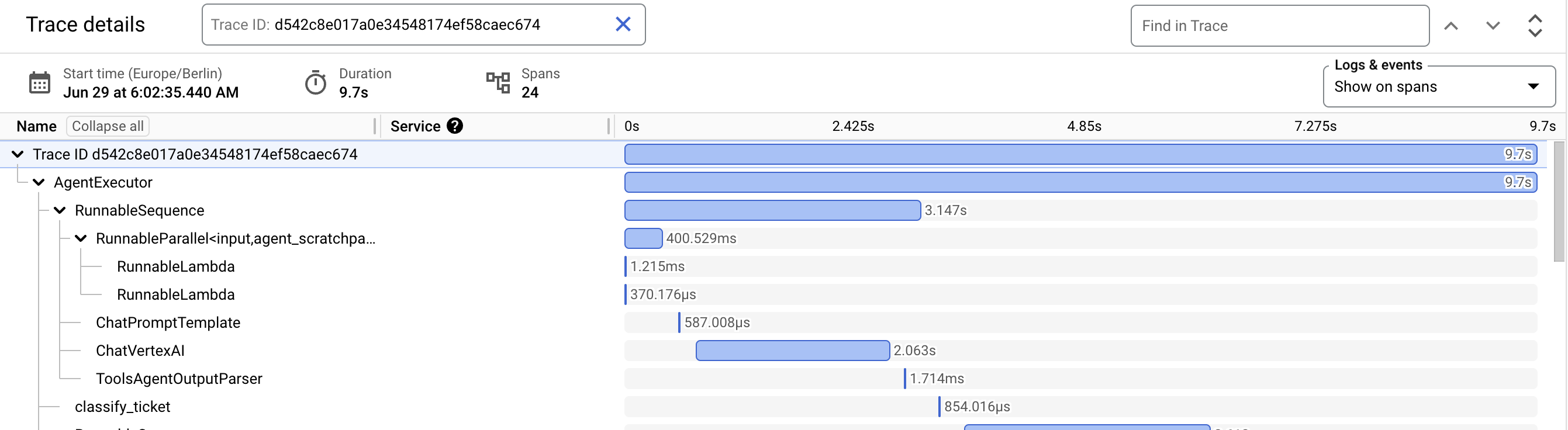
This notebook demonstrates how to:
- Learn Key Concepts: Learn about the fundamental building blocks of tracing.
- Deploy Your Agent: Make your tracing-enabled agent available in a production-like environment on Agent Engine.
- Enable Tracing: Enable tracing in a simple agent
- Examine Traces: Use the Cloud Console and Cloud Trace SDK to access and analyze a specific trace.
By the end of this notebook, you'll be able to leverage tracing to build more robust and efficient AI agents on Vertex AI.
Concepts
Here are some of the key concepts and terminology related to tracing, which will be helpful to understand as we explore traces generated by an agent in Agent Engine:
Below is an example of a trace in JSON format, showing a single span. This span represents a call to a large language model (LLM). Notice how the trace data captures important details:
Example trace
{
   "name": "llm",
   "context": {
       "trace_id": "ed7b336d-e71a-46f0-a334-5f2e87cb6cfc",
       "span_id": "ad67332a-38bd-428e-9f62-538ba2fa90d4"
   },
   "span_kind": "LLM",
   "parent_id": "f89ebb7c-10f6-4bf8-8a74-57324d2556ef",
   "start_time": "2023-09-07T12:54:47.597121-06:00",
   "end_time": "2023-09-07T12:54:49.321811-06:00",
   "status_code": "OK",
   "status_message": "",
   "attributes": {
       "llm.input_messages": [
           {
               "message.role": "system",
               "message.content": "You are an expert Q&A system that is trusted around the world.\nAlways answer the query using the provided context information, and not prior knowledge.\nSome rules to follow:\n1. Never directly reference the given context in your answer.\n2. Avoid statements like 'Based on the context, ...' or 'The context information ...' or anything along those lines."
           },
           {
               "message.role": "user",
               "message.content": "Hello?"
           }
       ],
       "output.value": "assistant: Yes I am here",
       "output.mime_type": "text/plain"
   },
   "events": [],
}
Trace
You can think of a trace like a timeline of requests as they travel through your application. A trace is composed of individual spans, with the first span representing the overall request. Each span provides details about a specific operation within the request.
Span
A span represents a single unit of work, like a function call or an interaction with an LLM. It captures information such as the operation's name, start and end times, and any relevant attributes (metadata). Spans can be nested, showing parent-child relationships between operations.
Span Attribute
Span attributes are key-value pairs that provide additional context about a span. For instance, an LLM span might have attributes like the model name, prompt text, and token count.
Span Kind
Span kind categorizes the type of operation a span represents. Common kinds include:
CHAIN: Links between LLM application steps or the start of a request.LLM: A call to a large language model.TOOL: An interaction with an external tool (API, database, etc.).AGENT: A reasoning block that combines LLM and tool interactions.
Get started
Install Vertex AI SDK and extra packages
%pip install --upgrade --quiet \
    "google-cloud-aiplatform[agent_engines,langchain]" \
    google-cloud-trace
Set Google Cloud project information and initialize Vertex AI SDK
To get started using Vertex AI, you must have an existing Google Cloud project and enable the Vertex AI API.
Learn more about setting up a project and a development environment.
PROJECT_ID = "[your-project-id]"  # @param {type:"string"}
LOCATION = "us-central1"  # @param {type:"string"}
STAGING_BUCKET = f"gs://{PROJECT_ID}-agent-engine-staging"  # @param {type:"string"}

import vertexai

vertexai.init(project=PROJECT_ID, location=LOCATION)
Authenticate your notebook environment (Colab only)
If you're running this notebook on Google Colab, run the cell below to authenticate your environment.
import sys

if "google.colab" in sys.modules:
    from google.colab import auth

    auth.authenticate_user(project_id=PROJECT_ID)
Build and deploy an agent
Let's dive into building a simple agent that utilizes tracing. This agent will use a few custom tools to demonstrate how tracing can provide insights into its workflow.
Import libraries
Before you start building your agent, you'll import the necessary libraries. These include the Vertex AI SDK, pandas for data analysis, and the Cloud Trace SDK for working with trace data.
from datetime import datetime, timedelta

import pandas as pd
from google.cloud import trace_v1 as trace
from vertexai.agent_engines import LangchainAgent
from vertexai.agent_engines._agent_engines import _utils
Define tools
You'll define a few Python functions to act as tools for your agent. These tools will simulate actions or API calls that a real-world agent might perform. For this example, you'll create tools to classify a customer support ticket, query a knowledge base, and escalate a ticket to a human agent.
def classify_ticket(ticket_text: str) -> str:
    """Classifies a support ticket into a category."""
    # Simulate a call to a classification model
    categories = {
        "general": "Questions and information",
        "billing": "Payment and invoices",
        "technical": "API and SDK developer documentation",
    }
    if "payment" in ticket_text:
        category = "billing"
        description = categories[category]
    elif "settings" in ticket_text:
        category = "technical"
        description = categories[category]
    else:
        category = "general"
        description = categories[category]

    return f"This ticket is in the {category} category for questions related to {description}"


def search_knowledge_base(category: str) -> list[dict]:
    """Searches a knowledge base for relevant articles and documentation links."""
    # Simulate a knowledge base search
    articles = {
        "general": [
            {
                "title": "Contacting support",
                "url": "https://example.com/contact",
            }
        ],
        "billing": [
            {
                "title": "How to update your payment information",
                "url": "https://example.com/billing/update",
            },
        ],
        "technical": [
            {
                "title": "Troubleshooting common login issues",
                "url": "https://example.com/technical/help",
            },
        ],
    }
    return articles.get(category, [])


def escalate_to_human(ticket_text: str) -> str:
    """Initiates escalation to a human agent for outage reports."""
    return "Your ticket has been escalated to a human agent. Please expect a response within 1-2 hours."
Define agent and enable tracing
Now, let's define your agent using the LangChain template in Agent Engine and the Vertex AI SDK. Enable tracing by setting the enable_tracing parameter to True, which allows you to capture detailed information about the agent's execution.
agent = LangchainAgent(
    model="gemini-2.5-flash",
    model_kwargs={"temperature": 0},
    tools=[classify_ticket, search_knowledge_base, escalate_to_human],
    enable_tracing=True,
)
Test your agent locally (with traces!)
Let's test your agent locally by sending it a query. Since you've enabled tracing, you'll be able to see how the agent processes this request and interacts with its tools.
response = agent.query(
    input="""
    Classify the following ticket into a category and give me a relevant documentation link.

    Support ticket text:
    I need to update my billing information since my payment method has expired.
    """
)

print(response["output"])
Output
WARNING:opentelemetry.exporter.cloud_trace:Span has more then 32 attributes, some will be truncated
WARNING:opentelemetry.exporter.cloud_trace:Span has more then 32 attributes, some will be truncated
The ticket has been classified as **Billing**.

Here is a relevant documentation link:
**How to update your payment information**: https://example.com/billing/update
Get your first trace
Before diving deeper into trace analysis, let's use the Cloud Trace SDK to retrieve a specific trace generated by your local agent. This will give you a concrete example to work with.
trace_client = trace.TraceServiceClient()result = [
r
for r in trace_client.list_traces(
request=trace.types.ListTracesRequest(
project_id=PROJECT_ID,
# Return all traces containing `labels {key: "openinference.span.kind" value: "AGENT"}`
filter="openinference.span.kind:AGENT",
)
)
]trace_data = trace_client.get_trace(
project_id=PROJECT_ID, trace_id=result[0].trace_id
).spans[0]
trace_dataOutput
span_id: 16482795484355138422
name: "AgentExecutor"
start_time {
seconds: 1775255962
nanos: 560381952
}
end_time {
seconds: 1775255968
nanos: 827016960
}
labels {
key: "output.value"
value: "The ticket has been classified as **Billing**.\n\nHere is a relevant documentation link:\n**How to update your payment information**: https://example.com/billing/update"
}
labels {
key: "openinference.span.kind"
value: "AGENT"
}
labels {
key: "input.value"
value: "\n Classify the following ticket into a category and give me a relevant documentation link.\n\n Support ticket text:\n I need to update my billing information since my payment method has expired.\n "
}
labels {
key: "g.co/agent"
value: "opentelemetry-python 1.38.0; google-cloud-trace-exporter 1.11.0"
}After you deploy your agent and make remote queries in the following sections, you'll dive into the details for working with trace data in the Cloud Console or using the Python SDK for Cloud Trace.
Deploy your agent
Now that you've seen how tracing works locally, let's deploy your agent to Agent Engine. This will allow you to send it queries in a production-like environment and observe its behavior through traces.
client = vertexai.Client(project=PROJECT_ID, location=LOCATION)
remote_agent = client.agent_engines.create(
agent=agent,
config={
"staging_bucket": STAGING_BUCKET,
"requirements": [
"google-cloud-aiplatform[agent_engines,langchain]",
],
},
)Query your deployed agent
With your agent deployed, you can interact with it remotely. Let's send a query and generate some trace data to explore.
response = remote_agent.query(
input="""
Classify the following ticket into a category and route the customer accordingly:
Support ticket text:
I am unable to make any API calls and I need to report an outage in the system
""",
)
print(response["output"])Output
Your ticket has been escalated to a human agent. Please expect a response within 1-2 hours.
Exploring traces in the Cloud Console
The Cloud Trace console provides a powerful and intuitive visual interface for exploring trace data, including visualizing, filtering, and analyzing your traces.
Accessing the Trace Console:
-
Project-Level View: To see all traces for your Google Cloud project (replace
your-project-idwith your actual project ID), go to: https://console.cloud.google.com/traces/list?project=your-project-id -
Specific Trace: If you know the unique Trace ID for a specific trace you want to examine, you can view it directly (replace your-trace-id with the actual Trace ID): https://console.cloud.google.com/traces/list?project=your-project-id&tid=your-trace-id
Features to Explore in the Console:
- Trace List: View a list of traces, sorted by start time, along with summary information (duration, number of spans).
- Waterfall View: Visualize the spans within a trace as a timeline, showing the duration of each operation and their relationships.
- Span Details: Click on a span to view its attributes, including the input and output data, and any custom metadata you've added.
- Filtering and Search: The console provides powerful options for filtering traces by time range, service, span name, and other criteria. You can also search for specific traces using keywords or attributes.
For a detailed guide to working with traces in the console, refer to the Cloud Trace documentation on finding traces. Experiment with the Cloud Trace console to gain a deeper understanding of your agent's behavior and how it's executing within Agent Engine.
Working with traces using pandas
For more programmatic analysis, you can use the pandas library to work with trace data. You'll fetch traces, convert them to DataFrames, and then use pandas' functionality to explore the trace data.
result = [
    r
    for r in trace_client.list_traces(
        request=trace.types.ListTracesRequest(
            project_id=PROJECT_ID,
            # Return all traces containing `labels {key: "openinference.span.kind" value: "AGENT"}`
            filter="openinference.span.kind:AGENT",
        )
    )
]trace_data = trace_client.get_trace(project_id=PROJECT_ID, trace_id=result[0].trace_id)spans = pd.DataFrame.from_records([_utils.to_dict(span) for span in trace_data.spans])
spans.head()Output
                span_id                                      name  \
0  16482795484355138422                             AgentExecutor
1  18320895560218625209                          RunnableSequence
2   5318547256719963820  RunnableParallel<input,agent_scratchpad>
3   6013497365941041661                            RunnableLambda
4   2333482926590071987                            RunnableLambda

                       start_time                        end_time  \
0  2026-04-03T22:39:22.560381952Z  2026-04-03T22:39:28.827016960Z
1  2026-04-03T22:39:22.561595904Z  2026-04-03T22:39:24.315962112Z
2  2026-04-03T22:39:22.562603008Z  2026-04-03T22:39:22.797123072Z
3  2026-04-03T22:39:22.563587072Z  2026-04-03T22:39:22.566780928Z
4     2026-04-03T22:39:22.564288Z  2026-04-03T22:39:22.564934912Z

                                              labels        parent_span_id
0  {'g.co/agent': 'opentelemetry-python 1.38.0; g...                   NaN
1  {'g.co/agent': 'opentelemetry-python 1.38.0; g...  16482795484355138422
2  {'g.co/agent': 'opentelemetry-python 1.38.0; g...  18320895560218625209
3  {'g.co/agent': 'opentelemetry-python 1.38.0; g...   5318547256719963820
4 {'g.co/agent': 'opentelemetry-python 1.38.0; g... 5318547256719963820 | span_id | name | start_time | end_time | labels | parent_span_id | |
|---|---|---|---|---|---|---|
| 0 | 16482795484355138422 | AgentExecutor | 2026-04-03T22:39:22.560381952Z | 2026-04-03T22:39:28.827016960Z | {'g.co/agent': 'opentelemetry-python 1.38.0; g... | NaN |
| 1 | 18320895560218625209 | RunnableSequence | 2026-04-03T22:39:22.561595904Z | 2026-04-03T22:39:24.315962112Z | {'g.co/agent': 'opentelemetry-python 1.38.0; g... | 16482795484355138422 |
| 2 | 5318547256719963820 | RunnableParallel<input,agent_scratchpad> | 2026-04-03T22:39:22.562603008Z | 2026-04-03T22:39:22.797123072Z | {'g.co/agent': 'opentelemetry-python 1.38.0; g... | 18320895560218625209 |
| 3 | 6013497365941041661 | RunnableLambda | 2026-04-03T22:39:22.563587072Z | 2026-04-03T22:39:22.566780928Z | {'g.co/agent': 'opentelemetry-python 1.38.0; g... | 5318547256719963820 |
| 4 | 2333482926590071987 | RunnableLambda | 2026-04-03T22:39:22.564288Z | 2026-04-03T22:39:22.564934912Z | {'g.co/agent': 'opentelemetry-python 1.38.0; g... | 5318547256719963820 |
spans[spans["name"] == "ChatVertexAI"]Output
                 span_id          name                      start_time  \
6    8043405965634465053  ChatVertexAI  2026-04-03T22:39:23.177999872Z
14  13701164588012977072  ChatVertexAI  2026-04-03T22:39:25.359444992Z
22     61932334341180327  ChatVertexAI  2026-04-03T22:39:27.309551872Z

                          end_time  \
6   2026-04-03T22:39:24.041608960Z
14  2026-04-03T22:39:26.071641088Z
22  2026-04-03T22:39:28.198946048Z

                                               labels        parent_span_id
6   {'llm.invocation_parameters': '{"model_name": ...  18320895560218625209
14  {'llm.invocation_parameters': '{"model_name": ...  18096436531831632048
22 {'llm.invocation_parameters': '{"model_name": ... 9055069022241508560 | span_id | name | start_time | end_time | labels | parent_span_id | |
|---|---|---|---|---|---|---|
| 6 | 8043405965634465053 | ChatVertexAI | 2026-04-03T22:39:23.177999872Z | 2026-04-03T22:39:24.041608960Z | {'llm.invocation_parameters': '{"model_name": ... | 18320895560218625209 |
| 14 | 13701164588012977072 | ChatVertexAI | 2026-04-03T22:39:25.359444992Z | 2026-04-03T22:39:26.071641088Z | {'llm.invocation_parameters': '{"model_name": ... | 18096436531831632048 |
| 22 | 61932334341180327 | ChatVertexAI | 2026-04-03T22:39:27.309551872Z | 2026-04-03T22:39:28.198946048Z | {'llm.invocation_parameters': '{"model_name": ... | 9055069022241508560 |
spans[spans["name"] == "ChatVertexAI"].labels.apply(pd.Series)Output
                            llm.invocation_parameters  \
6   {"model_name": "gemini-2.5-flash", "temperatur...
14  {"model_name": "gemini-2.5-flash", "temperatur...
22  {"model_name": "gemini-2.5-flash", "temperatur...

                                           g.co/agent llm.provider  \
6   opentelemetry-python 1.38.0; google-cloud-trac...       google
14  opentelemetry-python 1.38.0; google-cloud-trac...       google
22  opentelemetry-python 1.38.0; google-cloud-trac...       google

                                             metadata  output.mime_type  \
6   {"ls_provider": "google_vertexai", "ls_model_n...  application/json
14  {"ls_provider": "google_vertexai", "ls_model_n...               NaN
22  {"ls_provider": "google_vertexai", "ls_model_n...               NaN

   llm.input_messages.0.message.role llm.token_count.total  \
6                               user                   230
14                              user                   215
22                               NaN                   299

                                         output.value  \
6   {"generations": [[{"text": "", "generation_inf...
14                                                NaN
22                                                NaN

   llm.output_messages.0.message.tool_calls.0.tool_call.function.arguments  \
6   {"ticket_text": "I need to update my billing i...
14                            {"category": "billing"}
22                                                NaN

   llm.output_messages.0.message.tool_calls.0.tool_call.function.name  ...  \
6                                     classify_ticket                  ...
14                              search_knowledge_base                  ...
22                                                NaN                  ...

   llm.input_messages.3.message.tool_calls.0.tool_call.id  \
6                                                 NaN
14                                                NaN
22               570380c2-da43-462d-a03d-87b2848a006b

   llm.input_messages.3.message.tool_calls.0.tool_call.function.name  \
6                                                 NaN
14                                                NaN
22                              search_knowledge_base

   llm.input_messages.4.message.role  \
6                                NaN
14                               NaN
22                              tool

                llm.output_messages.0.message.content  \
6                                                 NaN
14                                                NaN
22  The ticket has been classified as **Billing**....

   llm.input_messages.3.message.function_call_arguments_json  \
6                                                 NaN
14                                                NaN
22                            {"category": "billing"}

   llm.input_messages.3.message.function_call_name  \
6                                              NaN
14                                             NaN
22                           search_knowledge_base

                 llm.input_messages.4.message.content  \
6                                                 NaN
14                                                NaN
22  [{"title": "How to update your payment informa...

   llm.input_messages.3.message.tool_calls.0.tool_call.function.arguments  \
6                                                 NaN
14                                                NaN
22                            {"category": "billing"}

   llm.input_messages.4.message.tool_call_id llm.input_messages.3.message.role
6                                        NaN                               NaN
14                                       NaN                               NaN
22      570380c2-da43-462d-a03d-87b2848a006b                         assistant

[3 rows x 46 columns]| llm.invocation_parameters | g.co/agent | llm.provider | metadata | output.mime_type | llm.input_messages.0.message.role | llm.token_count.total | output.value | llm.output_messages.0.message.tool_calls.0.tool_call.function.arguments | llm.output_messages.0.message.tool_calls.0.tool_call.function.name | ... | llm.input_messages.3.message.tool_calls.0.tool_call.id | llm.input_messages.3.message.tool_calls.0.tool_call.function.name | llm.input_messages.4.message.role | llm.output_messages.0.message.content | llm.input_messages.3.message.function_call_arguments_json | llm.input_messages.3.message.function_call_name | llm.input_messages.4.message.content | llm.input_messages.3.message.tool_calls.0.tool_call.function.arguments | llm.input_messages.4.message.tool_call_id | llm.input_messages.3.message.role | |
|---|---|---|---|---|---|---|---|---|---|---|---|---|---|---|---|---|---|---|---|---|---|
| 6 | {"model_name": "gemini-2.5-flash", "temperatur... | opentelemetry-python 1.38.0; google-cloud-trac... | {"ls_provider": "google_vertexai", "ls_model_n... | application/json | user | 230 | {"generations": [[{"text": "", "generation_inf... | {"ticket_text": "I need to update my billing i... | classify_ticket | ... | NaN | NaN | NaN | NaN | NaN | NaN | NaN | NaN | NaN | NaN | |
| 14 | {"model_name": "gemini-2.5-flash", "temperatur... | opentelemetry-python 1.38.0; google-cloud-trac... | {"ls_provider": "google_vertexai", "ls_model_n... | NaN | user | 215 | NaN | {"category": "billing"} | search_knowledge_base | ... | NaN | NaN | NaN | NaN | NaN | NaN | NaN | NaN | NaN | NaN | |
| 22 | {"model_name": "gemini-2.5-flash", "temperatur... | opentelemetry-python 1.38.0; google-cloud-trac... | {"ls_provider": "google_vertexai", "ls_model_n... | NaN | NaN | 299 | NaN | NaN | NaN | ... | 570380c2-da43-462d-a03d-87b2848a006b | search_knowledge_base | tool | The ticket has been classified as **Billing**.... | {"category": "billing"} | search_knowledge_base | [{"title": "How to update your payment informa... | {"category": "billing"} | 570380c2-da43-462d-a03d-87b2848a006b | assistant |
3 rows × 46 columns
Exploring traces with the Python SDK for Cloud Trace
The Cloud Trace Python SDK provides even more flexibility for working with trace data. We'll use it to demonstrate how to filter traces by date, time, labels, and view types.
Filter by date and time
# Calculate the start and end times
now = datetime.utcnow()
yesterday = now - timedelta(hours=24)

# Format the dates as ISO 8601 strings with 'Z' for UTC
end_time = now.isoformat() + "Z"
start_time = yesterday.isoformat() + "Z"

# Request a filtered list of traces by date and time
result = trace_client.list_traces(
    request=trace.types.ListTracesRequest(
        project_id=PROJECT_ID,
        start_time=start_time,
        end_time=end_time,
    )
)

for count, r in enumerate(result):
    if count >= 5:
        break
    print(r)
Filter by label
result = trace_client.list_traces(
    request=trace.types.ListTracesRequest(
        project_id=PROJECT_ID,
        # Return traces where any root span's name starts with AgentExecutor
        filter="root:AgentExecutor",
    )
)

for count, r in enumerate(result):
    if count >= 5:
        break
    print(r)
Filter by view type
result = trace_client.list_traces(
    request=trace.types.ListTracesRequest(
        project_id=PROJECT_ID,
        # view=trace.types.ListTracesRequest.ViewType.ROOTSPAN,
        view=trace.types.ListTracesRequest.ViewType.MINIMAL,
        # view=trace.types.ListTracesRequest.ViewType.COMPLETE,
    )
)

for count, r in enumerate(result):
    if count >= 5:
        break
    print(r)
Cleaning up
After you've finished experimenting, it's a good practice to clean up your cloud resources. You can delete the deployed Agent Engine instance and optionally remove the staging bucket to avoid any unexpected charges on your Google Cloud account.
# Delete the deployed agent
client.agent_engines.delete(name=remote_agent.api_resource.name)

# Optionally, delete the staging bucket
# from google.cloud import storage
# storage.Client().bucket(STAGING_BUCKET.replace("gs://", "")).delete(force=True)