
Chapter 70
使用 Microsoft Olive 微调 Phi-3
使用 Microsoft Olive 微调 Phi-3
Olive 是一款易用的硬件感知模型优化工具,集成了业界领先的模型压缩、优化和编译技术。
它旨在简化机器学习模型的优化流程,确保模型能够高效利用特定硬件架构。
无论你是在云端应用还是边缘设备上工作,Olive 都能帮助你轻松高效地优化模型。
主要特点:
- Olive 汇聚并自动化针对目标硬件的优化技术。
- 没有单一的优化技术适用于所有场景,Olive 支持扩展,允许行业专家接入他们的优化创新。
降低工程工作量:
- 开发者通常需要学习并使用多个硬件厂商特定的工具链来准备和优化训练好的模型以供部署。
- Olive 通过自动化目标硬件的优化技术简化了这一过程。
即用型端到端优化解决方案:
通过组合和调优集成技术,Olive 提供了统一的端到端优化方案。 它在优化模型时会考虑准确率和延迟等约束。
使用 Microsoft Olive 进行微调
Microsoft Olive 是一款非常易用的开源模型优化工具,覆盖了生成式人工智能领域的微调和推理。只需简单配置,结合开源小型语言模型及相关运行环境(AzureML / 本地 GPU、CPU、DirectML),即可通过自动优化完成模型的微调或推理,并找到最佳模型部署到云端或边缘设备。帮助企业在本地和云端构建自己的行业垂直模型。
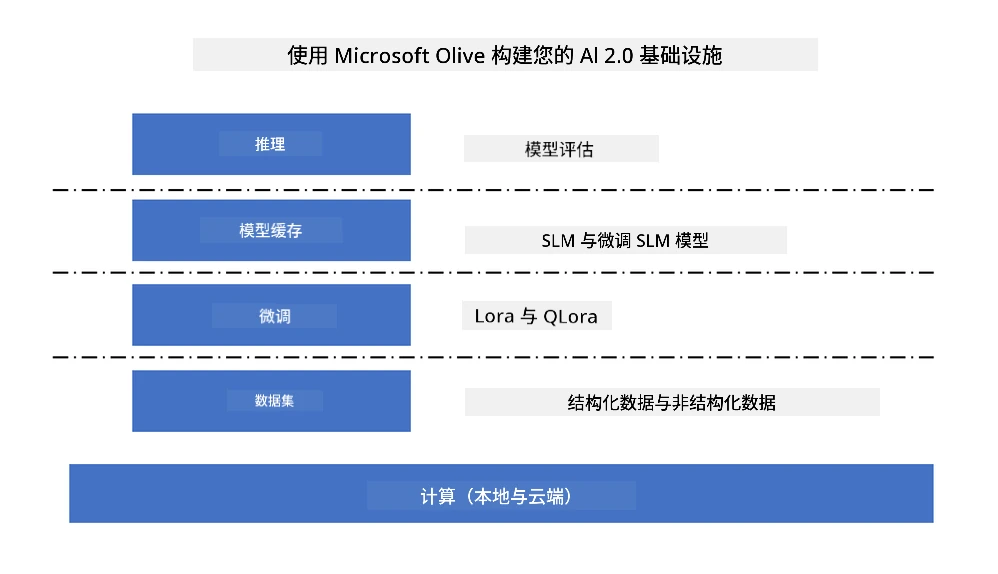
使用 Microsoft Olive 微调 Phi-3
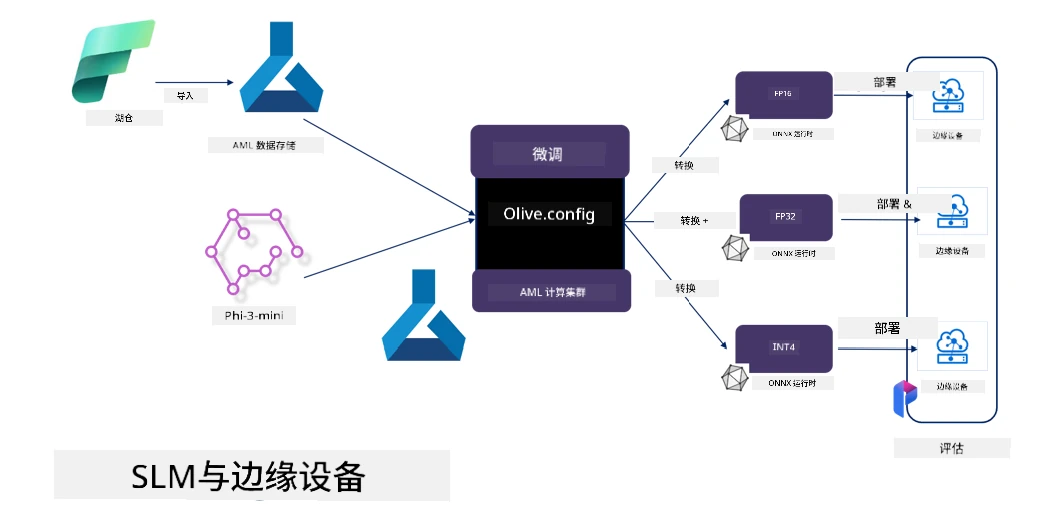
Phi-3 Olive 示例代码和案例
在本示例中,你将使用 Olive 来:
- 微调 LoRA 适配器,将短语分类为悲伤、喜悦、恐惧、惊讶。
- 将适配器权重合并到基础模型中。
- 优化并量化模型为 int4。
安装 Microsoft Olive
Microsoft Olive 安装非常简单,支持 CPU、GPU、DirectML 和 Azure ML 环境。
pip install olive-ai如果你想在 CPU 上运行 ONNX 模型,可以使用
pip install olive-ai[cpu]如果你想在 GPU 上运行 ONNX 模型,可以使用
pip install olive-ai[gpu]如果你想使用 Azure ML,可以使用
pip install git+https://github.com/microsoft/Olive#egg=olive-ai[azureml]注意 操作系统要求:Ubuntu 20.04 / 22.04
Microsoft Olive 的 Config.json
安装完成后,你可以通过 Config 文件配置不同模型的相关设置,包括数据、计算、训练、部署和模型生成。
1. 数据
Microsoft Olive 支持本地数据和云端数据训练,均可在配置中设置。
本地数据设置
你可以简单配置需要用于微调训练的数据集,通常为 json 格式,并配合数据模板使用。需要根据模型要求进行调整(例如,适配 Microsoft Phi-3-mini 所需格式。如果使用其他模型,请参考对应模型的微调格式要求进行处理)
    "data_configs": [
        {
            "name": "dataset_default_train",
            "type": "HuggingfaceContainer",
            "load_dataset_config": {
                "params": {
                    "data_name": "json",
                    "data_files":"dataset/dataset-classification.json",
                    "split": "train"
                }
            },
            "pre_process_data_config": {
                "params": {
                    "dataset_type": "corpus",
                    "text_cols": [
                            "phrase",
                            "tone"
                    ],
                    "text_template": "### Text: {phrase}\n### The tone is:\n{tone}",
                    "corpus_strategy": "join",
                    "source_max_len": 2048,
                    "pad_to_max_len": false,
                    "use_attention_mask": false
                }
            }
        }
    ],
云端数据源设置
通过关联 Azure AI Studio/Azure Machine Learning Service 的数据存储,可以通过 Microsoft Fabric 和 Azure Data 引入不同的数据源,支持微调数据。
    "data_configs": [
        {
            "name": "dataset_default_train",
            "type": "HuggingfaceContainer",
            "load_dataset_config": {
                "params": {
                    "data_name": "json",
                    "data_files": {
                        "type": "azureml_datastore",
                        "config": {
                            "azureml_client": {
                                "subscription_id": "Your Azure Subscrition ID",
                                "resource_group": "Your Azure Resource Group",
                                "workspace_name": "Your Azure ML Workspaces name"
                            },
                            "datastore_name": "workspaceblobstore",
                            "relative_path": "Your train_data.json Azure ML Location"
                        }
                    },
                    "split": "train"
                }
            },
            "pre_process_data_config": {
                "params": {
                    "dataset_type": "corpus",
                    "text_cols": [
                            "Question",
                            "Best Answer"
                    ],
                    "text_template": "<|user|>\n{Question}<|end|>\n<|assistant|>\n{Best Answer}\n<|end|>",
                    "corpus_strategy": "join",
                    "source_max_len": 2048,
                    "pad_to_max_len": false,
                    "use_attention_mask": false
                }
            }
        }
    ],
2. 计算配置
如果需要本地运行,可以直接使用本地数据资源。若需使用 Azure AI Studio / Azure Machine Learning Service 的资源,则需配置相关 Azure 参数、计算资源名称等。
    "systems": {
        "aml": {
            "type": "AzureML",
            "config": {
                "accelerators": ["gpu"],
                "hf_token": true,
                "aml_compute": "Your Azure AI Studio / Azure Machine Learning Service Compute Name",
                "aml_docker_config": {
                    "base_image": "Your Azure AI Studio / Azure Machine Learning Service docker",
                    "conda_file_path": "conda.yaml"
                }
            }
        },
        "azure_arc": {
            "type": "AzureML",
            "config": {
                "accelerators": ["gpu"],
                "aml_compute": "Your Azure AI Studio / Azure Machine Learning Service Compute Name",
                "aml_docker_config": {
                    "base_image": "Your Azure AI Studio / Azure Machine Learning Service docker",
                    "conda_file_path": "conda.yaml"
                }
            }
        }
    },
注意
由于是在 Azure AI Studio/Azure Machine Learning Service 的容器中运行,需要配置相应环境,配置内容在 conda.yaml 文件中。
name: project_environment
channels:
  - defaults
dependencies:
  - python=3.8.13
  - pip=22.3.1
  - pip:
      - einops
      - accelerate
      - azure-keyvault-secrets
      - azure-identity
      - bitsandbytes
      - datasets
      - huggingface_hub
      - peft
      - scipy
      - sentencepiece
      - torch>=2.2.0
      - transformers
      - git+https://github.com/microsoft/Olive@jiapli/mlflow_loading_fix#egg=olive-ai[gpu]
      - --extra-index-url https://aiinfra.pkgs.visualstudio.com/PublicPackages/_packaging/ORT-Nightly/pypi/simple/
      - ort-nightly-gpu==1.18.0.dev20240307004
      - --extra-index-url https://aiinfra.pkgs.visualstudio.com/PublicPackages/_packaging/onnxruntime-genai/pypi/simple/
      - onnxruntime-genai-cuda
3. 选择你的 SLM
你可以直接使用 Hugging Face 上的模型,也可以结合 Azure AI Studio / Azure Machine Learning 的模型目录选择使用的模型。以下代码示例以 Microsoft Phi-3-mini 为例。
如果你有本地模型,可以使用此方法
    "input_model":{
        "type": "PyTorchModel",
        "config": {
            "hf_config": {
                "model_name": "model-cache/microsoft/phi-3-mini",
                "task": "text-generation",
                "model_loading_args": {
                    "trust_remote_code": true
                }
            }
        }
    },
如果想使用 Azure AI Studio / Azure Machine Learning Service 上的模型,可以使用此方法
    "input_model":{
        "type": "PyTorchModel",
        "config": {
            "model_path": {
                "type": "azureml_registry_model",
                "config": {
                    "name": "microsoft/Phi-3-mini-4k-instruct",
                    "registry_name": "azureml-msr",
                    "version": "11"
                }
            },
             "model_file_format": "PyTorch.MLflow",
             "hf_config": {
                "model_name": "microsoft/Phi-3-mini-4k-instruct",
                "task": "text-generation",
                "from_pretrained_args": {
                    "trust_remote_code": true
                }
            }
        }
    },
注意: 需要与 Azure AI Studio / Azure Machine Learning Service 集成,设置模型时请参考版本号和相关命名。
Azure 上的所有模型需设置为 PyTorch.MLflow。
你需要拥有 Hugging Face 账号,并将密钥绑定到 Azure AI Studio / Azure Machine Learning 的 Key 值中。
4. 算法
Microsoft Olive 对 Lora 和 QLora 微调算法封装良好,只需配置相关参数。这里以 QLora 为例。
        "lora": {
            "type": "LoRA",
            "config": {
                "target_modules": [
                    "o_proj",
                    "qkv_proj"
                ],
                "double_quant": true,
                "lora_r": 64,
                "lora_alpha": 64,
                "lora_dropout": 0.1,
                "train_data_config": "dataset_default_train",
                "eval_dataset_size": 0.3,
                "training_args": {
                    "seed": 0,
                    "data_seed": 42,
                    "per_device_train_batch_size": 1,
                    "per_device_eval_batch_size": 1,
                    "gradient_accumulation_steps": 4,
                    "gradient_checkpointing": false,
                    "learning_rate": 0.0001,
                    "num_train_epochs": 3,
                    "max_steps": 10,
                    "logging_steps": 10,
                    "evaluation_strategy": "steps",
                    "eval_steps": 187,
                    "group_by_length": true,
                    "adam_beta2": 0.999,
                    "max_grad_norm": 0.3
                }
            }
        },
如果需要量化转换,Microsoft Olive 主分支已支持 onnxruntime-genai 方法。你可以根据需求设置:
- 将适配器权重合并到基础模型
- 使用 ModelBuilder 将模型转换为所需精度的 onnx 模型
例如转换为量化的 INT4
        "merge_adapter_weights": {
            "type": "MergeAdapterWeights"
        },
        "builder": {
            "type": "ModelBuilder",
            "config": {
                "precision": "int4"
            }
        }
注意
-
如果使用 QLoRA,目前不支持 ONNXRuntime-genai 的量化转换。
-
这里需要说明的是,你可以根据自身需求设置上述步骤,不必全部配置。根据需求,可以直接使用算法步骤而不进行微调,最后配置相关引擎即可。
    "engine": {
        "log_severity_level": 0,
        "host": "aml",
        "target": "aml",
        "search_strategy": false,
        "execution_providers": ["CUDAExecutionProvider"],
        "cache_dir": "../model-cache/models/phi3-finetuned/cache",
        "output_dir": "../model-cache/models/phi3-finetuned"
    }
5. 微调完成
在包含 olive-config.json 的目录下,通过命令行执行
olive run --config olive-config.json 免责声明:
本文件使用 AI 翻译服务 Co-op Translator 进行翻译。虽然我们力求准确,但请注意,自动翻译可能包含错误或不准确之处。原始文件的母语版本应被视为权威来源。对于重要信息,建议使用专业人工翻译。对于因使用本翻译而产生的任何误解或误释,我们不承担任何责任。