
Chapter 57
6.7 Gradient boosting and XGBoost
6.7 Gradient boosting and XGBoost
Notes
Gradient Boosting
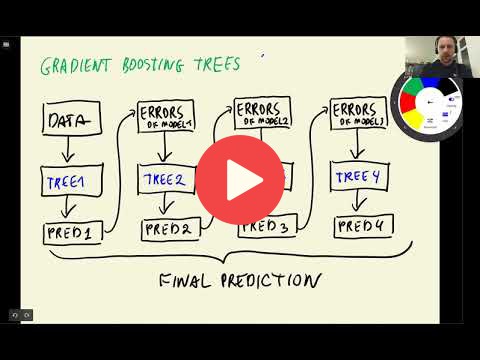
Unlike Random Forest where each decision tree trains independently, in the Gradient Boosting Trees, the models are combined sequentially, where each model takes the prediction errors made by the previous model and then tries to improve the prediction. This process continues to n number of iterations, and in the end, all the predictions get combined to make the final prediction.
XGBoost is one of the libraries which implements the gradient boosting technique. To make use of the library, we need to install with pip install xgboost. To train and evaluate the model, we need to wrap our train and validation data into a special data structure from XGBoost which is called DMatrix. This data structure is optimized to train XGBoost models faster.
XGBoost Training Parameters
eta: learning rate, which indicates how fast the model learns.max_depth: to control the size of the trees.min_child_weight: to control the minimum size of a child node.objective: To specify which problem we are trying to solve, either regression, or classification (binary:'binary:logistic', or other).nthread: 8, used for parallelized training.seed: 1, for reproducibility.verbosity: 1 (True) to show warnings, if any, during model training.
Classes, functions, and methods:
xgb.train(): method to train xgboost model.xgb_params: key-value pairs of hyperparameters to train xgboost model.watchlist: list to store training and validation data to evaluate the performance of the model after each training iteration. The list takes tuple of train and validation set from DMatrix wrapper, for example,watchlist = [(dtrain, 'train'), (dval, 'val')].%%capture output: IPython magic command which captures the standard output and standard error of a cell.
Add notes from the video (PRs are welcome)
Extracting results from xgb.train(..)
In the video we use jupyter magic command %%capture output to extract the output of xgb.train(..) method.
Alternatively you can use the evals_result parameter of the xgb.train(..). You can pass an empty dictionary in for this parameter and the train() method will populate it with the results. The result will be of type OrderedDict so we have to transform it to a dataframe. For this, zip() can help. Here's an example code snippet:
evals_result = {}

model = xgb.train(params=xgb_params,
                  dtrain=dm_train,
                  num_boost_round=200,
                  verbose_eval=5,
                  evals=watchlist,
                  evals_result=evals_result)

columns = ['iter', 'train_auc', 'val_auc']
train_aucs = list(evals_result['train'].values())[0]
val_aucs = list(evals_result['val'].values())[0]

df_scores = pd.DataFrame(
    list(zip(
        range(1, len(train_aucs) + 1),
        train_aucs,
        val_aucs
    )), columns=columns)

plt.plot(df_scores.iter, df_scores.train_auc, label='train')
plt.plot(df_scores.iter, df_scores.val_auc, label='val')
plt.legend()
Installing XGBoost on Mac
Some students reported problems with installing XGBoost on Mac.
When you run pip install xgboost and when you try to import xgboost in a script you might get an warning or error stating that libomp has not been installed and to run brew install libomp in the terminal.
Be careful: this will install a version of libomp that does not work with xgboost!
This shows in one of two ways after attempting to run xgb.DMatrix(X_train, label=y_train, feature_names=features):
- python script: Segmentation fault: 11
- jupyter notebook: Never finished running, and notebook is unresponsive until kernal restart. However confusingly it sometimes works
Conda
If you use anaconda or miniconda, try installing xgboost with conda.
First, uninstall xgboost with pip (if you already installed it previously with pip):
pip uninstall xgboostThen re-install it with conda:
conda install -c conda-forge xgboostIt will also install the required version of libomp.
Without conda
If you don't use conda, you can manualy install a different version of libopm that works well with XGBoost.
The versions of libomp with this problem are 12.x.x and 13.x.x, however issue has a workaround xgboost issue #7039 installing the older libomp 11 using the terminal. In the terminal run brew list --version libomp, to determine the current version of libomp if any. Then if you have a problematic version run brew unlink libomp.
To install the old version of libomp run:
brew update
wget https://raw.githubusercontent.com/chenrui333/homebrew-core/0094d1513ce9e2e85e07443b8b5930ad298aad91/Formula/libomp.rb
brew install --build-from-source ./libomp.rb
and then run
brew list --version libompto check that everything worked, it should now state libomp 11.1.0, and your code should now be able to run.