
Chapter 12
集成函数调用
集成函数调用
到目前为止,你已经在之前的课程中学到了不少内容。然而,我们还可以进一步改进。一些我们可以解决的问题包括如何获得更一致的响应格式,以便更方便地在后续处理响应。此外,我们可能还想添加来自其他来源的数据,以进一步丰富我们的应用程序。
上述问题就是本章要解决的内容。
介绍
本课将涵盖:
- 解释什么是函数调用及其使用场景。
- 使用 Azure OpenAI 创建函数调用。
- 如何将函数调用集成到应用程序中。
学习目标
课程结束时,你将能够:
- 解释使用函数调用的目的。
- 使用 Azure OpenAI 服务设置函数调用。
- 设计适合你应用场景的有效函数调用。
场景:通过函数改进聊天机器人
在本课中,我们要为我们的教育初创公司构建一个功能,允许用户使用聊天机器人查找技术课程。我们将推荐符合他们技能水平、当前角色和感兴趣技术的课程。
为完成此场景,我们将结合使用:
Azure OpenAI为用户创建聊天体验。Microsoft Learn Catalog API帮助用户基于请求查找课程。函数调用将用户查询发送给函数以发起 API 请求。
现在开始,我们先来看为什么我们首先想要使用函数调用:
为什么使用函数调用
在函数调用出现之前,LLM 的响应是无结构和不一致的。开发者需要编写复杂的验证代码来确保能够处理每种响应变体。用户无法获得像“斯德哥尔摩当前天气如何?”这样的答案,因为模型受训练数据时间限制。
函数调用是 Azure OpenAI 服务的一个功能,用来克服以下限制:
- 响应格式一致。如果我们可以更好地控制响应格式,就能更容易将响应集成到下游系统。
- 外部数据。能够在聊天上下文中使用应用程序其他来源的数据。
通过场景说明问题
如果你想运行下面的场景,建议使用本课附带的笔记本。你也可以边看边理解,我们旨在说明函数在解决该问题时的作用。
让我们来看一个说明响应格式问题的示例:
假设我们想创建一个学生数据数据库,以便向他们推荐合适的课程。以下是两个学生描述,数据非常相似。
-
建立到我们的 Azure OpenAI 资源的连接:
pythonimport os import json from openai import OpenAI from dotenv import load_dotenv load_dotenv() # Responses API 由 Azure OpenAI(Microsoft Foundry)v1 端点提供服务 # 因此我们将 OpenAI 客户端指向 <your-endpoint>/openai/v1/。 endpoint = os.environ['AZURE_OPENAI_ENDPOINT'] client = OpenAI( api_key=os.environ['AZURE_OPENAI_API_KEY'], base_url=f"{endpoint.rstrip('/')}/openai/v1/", ) deployment=os.environ['AZURE_OPENAI_DEPLOYMENT']以下是配置 Azure OpenAI 连接的 Python 代码。因为我们使用的是 v1 端点,只需要设置
api_key和base_url(不需要api_version)。 -
使用变量
student_1_description和student_2_description创建两个学生描述。pythonstudent_1_description="Emily Johnson is a sophomore majoring in computer science at Duke University. She has a 3.7 GPA. Emily is an active member of the university's Chess Club and Debate Team. She hopes to pursue a career in software engineering after graduating." student_2_description = "Michael Lee is a sophomore majoring in computer science at Stanford University. He has a 3.8 GPA. Michael is known for his programming skills and is an active member of the university's Robotics Club. He hopes to pursue a career in artificial intelligence after finishing his studies."我们想将上述学生描述发送给 LLM 以解析数据。该数据稍后可用于我们的应用程序,也可以发送至 API 或存储在数据库中。
-
创建两个相同的提示,指导 LLM 我们关心哪些信息:
pythonprompt1 = f''' Please extract the following information from the given text and return it as a JSON object: name major school grades club This is the body of text to extract the information from: {student_1_description} ''' prompt2 = f''' Please extract the following information from the given text and return it as a JSON object: name major school grades club This is the body of text to extract the information from: {student_2_description} '''以上提示指导 LLM 提取信息并以 JSON 格式返回响应。
-
设置好提示和 Azure OpenAI 连接后,我们现在通过
client.responses.create将提示发送给 LLM。我们将提示存储在input变量中,并将角色分配为user,以模拟用户发送给聊天机器人的消息。python# 来自提示一的响应 openai_response1 = client.responses.create( model=deployment, input = [{'role': 'user', 'content': prompt1}], store=False, ) openai_response1.output_text # 来自提示二的响应 openai_response2 = client.responses.create( model=deployment, input = [{'role': 'user', 'content': prompt2}], store=False, ) openai_response2.output_text
现在我们可以将两个请求都发送给 LLM,并通过 openai_response1.output_text 查看响应。
-
最后,我们可以通过调用
json.loads将响应转换为 JSON 格式:python# 以 JSON 对象加载响应 json_response1 = json.loads(openai_response1.output_text) json_response1响应 1:
json{ "name": "Emily Johnson", "major": "computer science", "school": "Duke University", "grades": "3.7", "club": "Chess Club" }响应 2:
json{ "name": "Michael Lee", "major": "computer science", "school": "Stanford University", "grades": "3.8 GPA", "club": "Robotics Club" }尽管提示相同且描述类似,我们发现
Grades属性的值格式不统一,有时是3.7,有时是3.7 GPA。这是因为 LLM 接受的是无结构的文本提示,返回的也是无结构数据。我们需要结构化格式,这样才能在存储或使用数据时明确预期。
那么我们如何解决格式问题呢?通过使用函数调用,我们可以确保收到结构化数据。使用函数调用时,LLM 并不会真正调用或运行任何函数。相反,我们为 LLM 创建一个响应结构,让它按此结构返回结果。我们随后利用这些结构化响应,决定应用中调用哪个函数。
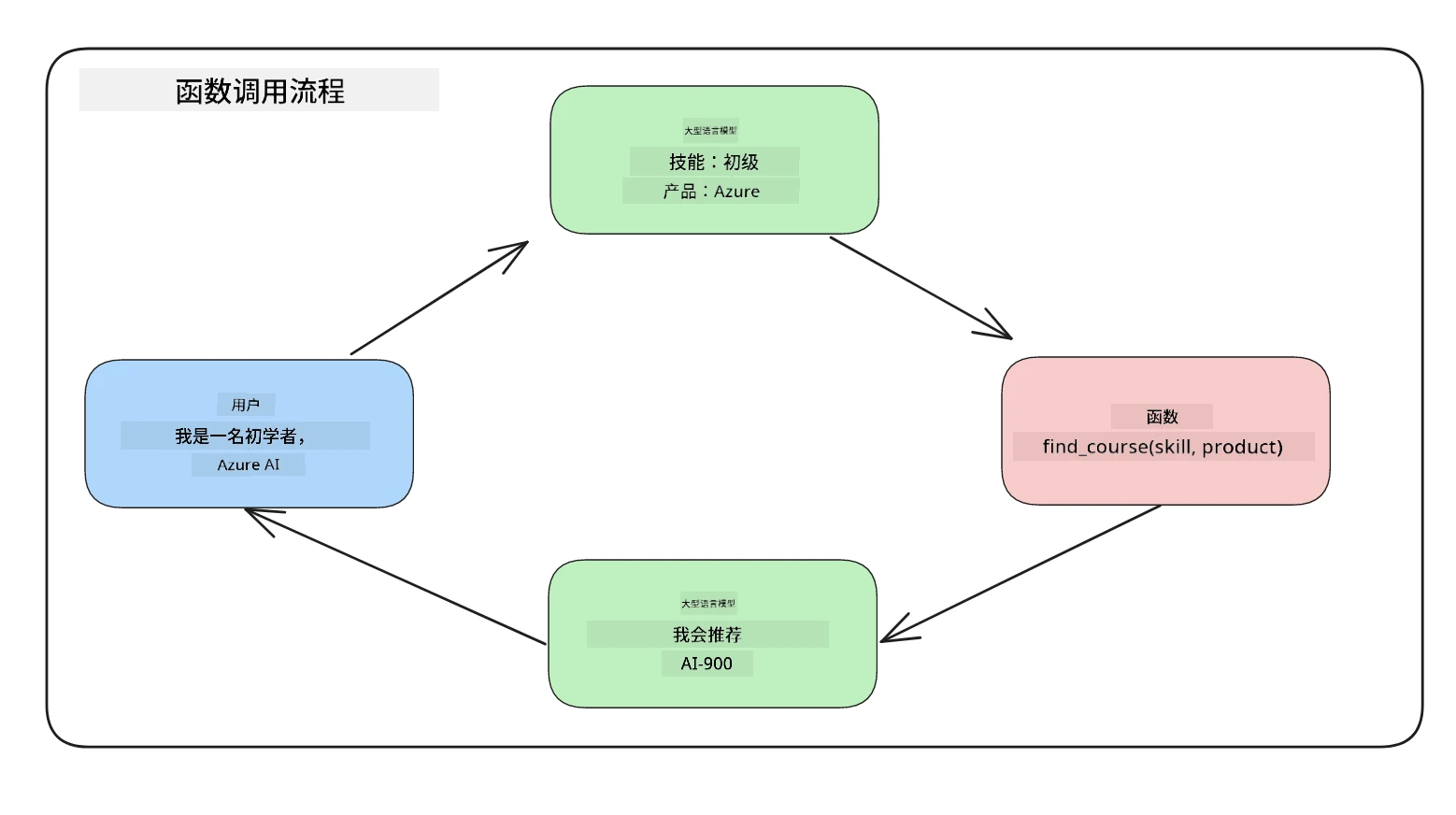
然后我们可以将函数返回的内容发送回 LLM,LLM 会使用自然语言回答用户的问题。
函数调用的使用场景
有许多场景中函数调用可以提升你的应用,比如:
-
调用外部工具。聊天机器人用来回答用户问题很出色。通过函数调用,聊天机器人可以利用用户消息完成某些任务。例如,学生可以让聊天机器人“给我的老师发封邮件,说我需要关于这门课的更多帮助”。这会调用函数
send_email(to: string, body: string)。 -
创建 API 或数据库查询。用户可以使用自然语言查找信息,转换成格式化查询或 API 请求。例如,教师请求“谁完成了最后一次作业?”时,可以调用函数
get_completed(student_name: string, assignment: int, current_status: string)。 -
生成结构化数据。用户可以提交一段文本或 CSV,使用 LLM 提取重要信息。例如,学生可以将关于和平协议的维基百科文章转换为 AI 闪卡。此操作可通过函数
get_important_facts(agreement_name: string, date_signed: string, parties_involved: list)实现。
创建第一个函数调用
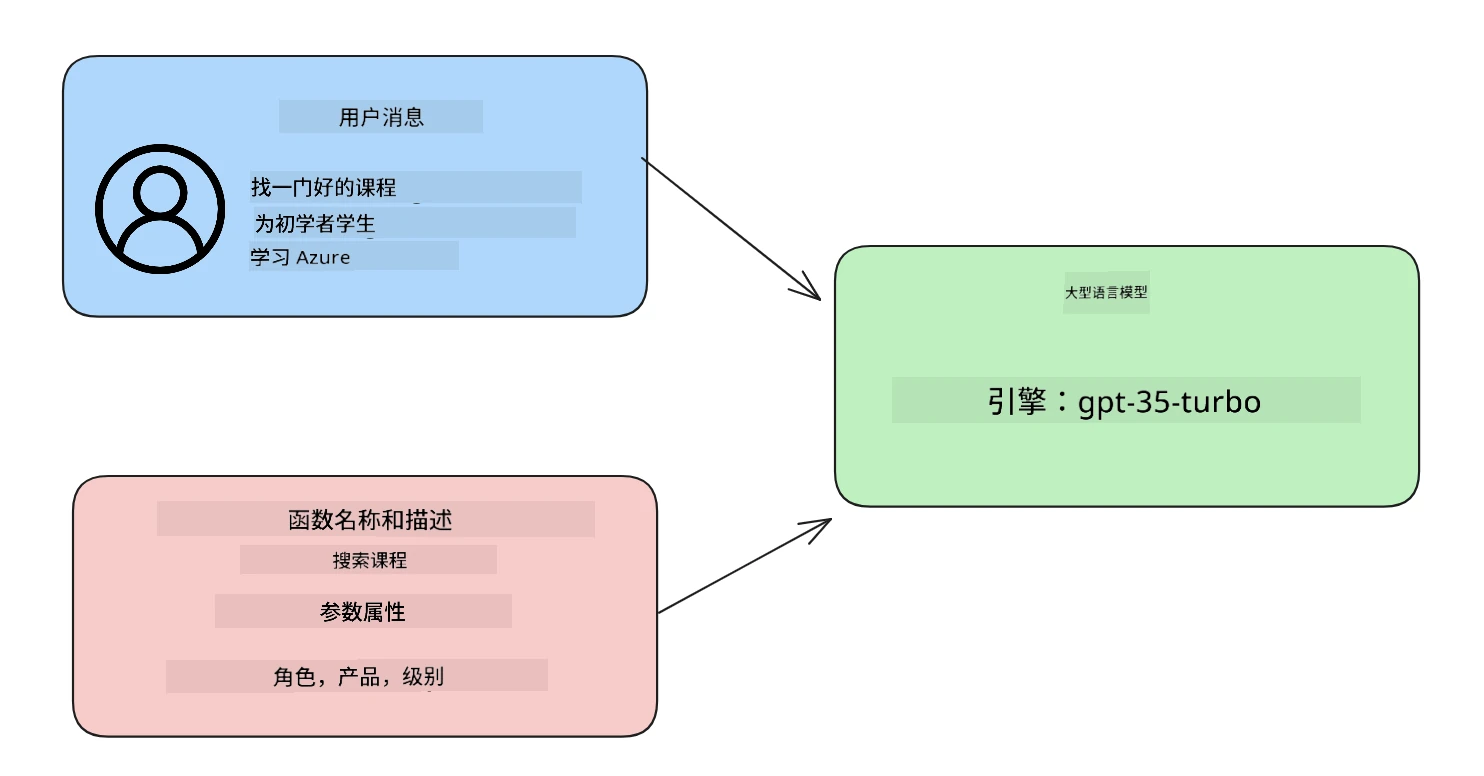
创建函数调用的过程包括三个主要步骤:
- 使用函数(工具)列表和用户消息调用响应 API。
- 读取模型的响应以执行某个操作,例如调用函数或 API。
- 使用函数响应再次调用响应 API,利用这些信息生成对用户的回复。
第一步 - 创建消息
第一步是创建一个用户消息。该值可以动态赋值,例如取自文本输入,也可以直接赋值。如果是首次使用响应 API,需要定义消息的 role 和 content。
role 可以是 system(创建规则),assistant(模型)或 user(终端用户)。在函数调用中,我们将此设置为 user 并给出示例问题。
messages= [ {"role": "user", "content": "Find me a good course for a beginner student to learn Azure."} ]通过分配不同角色,LLM 会清楚是系统说话还是用户说话,从而建立可供 LLM 构建的对话历史。
第二步 - 创建函数
接下来,我们定义一个函数及其参数。这里仅用一个名为 search_courses 的函数,你也可以创建多个函数。
重要:函数包含在发送给 LLM 的系统消息中,会占用可用的 token 数量。
下方以数组形式创建函数。每个元素是响应 API 中的工具,具有属性 type、name、description 和 parameters:
functions = [
   {
      "type":"function",
      "name":"search_courses",
      "description":"Retrieves courses from the search index based on the parameters provided",
      "parameters":{
         "type":"object",
         "properties":{
            "role":{
               "type":"string",
               "description":"The role of the learner (i.e. developer, data scientist, student, etc.)"
            },
            "product":{
               "type":"string",
               "description":"The product that the lesson is covering (i.e. Azure, Power BI, etc.)"
            },
            "level":{
               "type":"string",
               "description":"The level of experience the learner has prior to taking the course (i.e. beginner, intermediate, advanced)"
            }
         },
         "required":[
            "role"
         ]
      }
   }
]
下面详细描述函数实例的各个部分:
name- 函数名称。description- 函数功能说明,需具体清晰。parameters- 希望模型在响应中产生的值和格式。参数数组包含以下属性:type- 属性存储的数据类型。properties- 模型将在响应中使用的具体值列表。name- 属性键名,例如product。type- 该属性的数据类型,例如string。description- 属性说明。
此外,还有一个可选属性 required - 函数调用必需的属性。
第三步 - 进行函数调用
定义函数后,需要在调用响应 API 时包含它。可通过将 tools 设置为 functions 实现。
还有一个选项是将 tool_choice 设置为 auto,即由 LLM 根据用户消息决定调用哪个函数,而非手动分配。
下面是调用 client.responses.create 的代码示例,注意设置了 tools=functions 和 tool_choice="auto",让 LLM 自行决定调用函数时机:
response = client.responses.create(model=deployment,
                                        input=messages,
                                        tools=functions,
                                        tool_choice="auto",
                                        store=False)

print(response.output)
现在返回的响应中,在 response.output 中包含了一个 function_call 项,看起来如下:
{
  "type": "function_call",
  "name": "search_courses",
  "call_id": "call_abc123",
  "arguments": "{\n  \"role\": \"student\",\n  \"product\": \"Azure\",\n  \"level\": \"beginner\"\n}"
}
在这里我们可以看到函数 search_courses 被调用了,带的参数在 JSON 响应的 arguments 属性中列出。
LLM 能提取数据填充函数参数,是因为它从传入响应 API 的 input 参数的值中抽取相应信息。下面是 messages 的提醒:
messages= [ {"role": "user", "content": "Find me a good course for a beginner student to learn Azure."} ]如你所见,student、Azure 和 beginner 从 messages 中提取并设置为函数输入。通过函数调用提取信息是一种很棒的方式,同时也给 LLM 提供了结构化和可重用功能。
接下来,我们看看如何在应用程序中使用它。
将函数调用集成到应用中
在测试了 LLM 返回的结构化响应后,我们现在可以将其集成到应用中。
流程管理
集成到应用中,我们采取以下步骤:
-
首先,调用 OpenAI 服务,从响应
output中提取函数调用项。pythonresponse_items = response.output tool_calls = [item for item in response_items if item.type == "function_call"] -
现在定义调用 Microsoft Learn API 以获取课程列表的函数:
pythonimport requests def search_courses(role, product, level): url = "https://learn.microsoft.com/api/catalog/" params = { "role": role, "product": product, "level": level } response = requests.get(url, params=params) modules = response.json()["modules"] results = [] for module in modules[:5]: title = module["title"] url = module["url"] results.append({"title": title, "url": url}) return str(results)注意我们现在创建了实际的 Python 函数,对应
functions变量中的函数名称。我们实际上调用外部 API 拉取数据,这里是对 Microsoft Learn API 搜索培训模块。
好的,创建了 functions 变量和对应的 Python 函数,我们如何告诉 LLM 将二者映射,使我们的 Python 函数被调用?
-
判断是否调用 Python 函数,需要查看 LLM 响应中是否包含
function_call条目,并调用相应函数。下面是检查代码示例:python# 检查模型是否想调用一个函数 if tool_calls: for tool_call in tool_calls: print("Recommended Function call:") print(tool_call.name) print() # 调用该函数。 function_name = tool_call.name available_functions = { "search_courses": search_courses, } function_to_call = available_functions[function_name] function_args = json.loads(tool_call.arguments) function_response = function_to_call(**function_args) print("Output of function call:") print(function_response) print(type(function_response)) # 将函数调用及其结果添加回对话中。 # 模型的 function_call 项必须附加在其输出之前。 messages.append(tool_call) # 助手的 function_call 项 messages.append( # 函数结果 { "type": "function_call_output", "call_id": tool_call.call_id, "output": function_response, } )这三行代码能确保提取函数名、参数并执行调用:
pythonfunction_to_call = available_functions[function_name] function_args = json.loads(tool_call.arguments) function_response = function_to_call(**function_args)以下是运行以上代码的输出:
输出
recommended{ "name": "search_courses", "arguments": "{\n \"role\": \"student\",\n \"product\": \"Azure\",\n \"level\": \"beginner\"\n}" } Output of function call: [{'title': 'Describe concepts of cryptography', 'url': 'https://learn.microsoft.com/training/modules/describe-concepts-of-cryptography/? WT.mc_id=api_CatalogApi'}, {'title': 'Introduction to audio classification with TensorFlow', 'url': 'https://learn.microsoft.com/en- us/training/modules/intro-audio-classification-tensorflow/?WT.mc_id=api_CatalogApi'}, {'title': 'Design a Performant Data Model in Azure SQL Database with Azure Data Studio', 'url': 'https://learn.microsoft.com/training/modules/design-a-data-model-with-ads/? WT.mc_id=api_CatalogApi'}, {'title': 'Getting started with the Microsoft Cloud Adoption Framework for Azure', 'url': 'https://learn.microsoft.com/training/modules/cloud-adoption-framework-getting-started/?WT.mc_id=api_CatalogApi'}, {'title': 'Set up the Rust development environment', 'url': 'https://learn.microsoft.com/training/modules/rust-set-up-environment/?WT.mc_id=api_CatalogApi'}] <class 'str'> -
现在我们将更新后的消息
messages发送到 LLM,以获得自然语言响应,而非 API JSON 格式响应。pythonprint("Messages in next request:") print(messages) print() second_response = client.responses.create( input=messages, model=deployment, tool_choice="auto", tools=functions, temperature=0, store=False, ) # 从模型获取一个新的响应,其中它可以看到函数的响应 print(second_response.output_text)输出
textI found some good courses for beginner students to learn Azure: 1. [Describe concepts of cryptography](https://learn.microsoft.com/training/modules/describe-concepts-of-cryptography/?WT.mc_id=api_CatalogApi) 2. [Introduction to audio classification with TensorFlow](https://learn.microsoft.com/training/modules/intro-audio-classification-tensorflow/?WT.mc_id=api_CatalogApi) 3. [Design a Performant Data Model in Azure SQL Database with Azure Data Studio](https://learn.microsoft.com/training/modules/design-a-data-model-with-ads/?WT.mc_id=api_CatalogApi) 4. [Getting started with the Microsoft Cloud Adoption Framework for Azure](https://learn.microsoft.com/training/modules/cloud-adoption-framework-getting-started/?WT.mc_id=api_CatalogApi) 5. [Set up the Rust development environment](https://learn.microsoft.com/training/modules/rust-set-up-environment/?WT.mc_id=api_CatalogApi) You can click on the links to access the courses.
作业
如需继续学习 Azure OpenAI 函数调用,可以构建:
-
更多功能参数,帮助学习者发现更多课程。
-
创建另一个函数调用,从学习者那里获取更多信息,比如他们的母语
-
在函数调用和/或 API 调用未返回任何合适课程时,创建错误处理
提示:请参阅 Learn API 参考文档 页面,了解这些数据如何以及在哪里可用。
干得好!继续前行
完成本课后,查看我们的 生成式 AI 学习集合,继续提升您的生成式 AI 知识!
前往第12课,我们将学习如何为 AI 应用设计 用户体验!
免责声明: 本文件由 AI 翻译服务 Co-op Translator 翻译完成。尽管我们力求准确,但请注意,自动翻译可能包含错误或不准确之处。原始语言版文件应视为权威来源。对于重要信息,建议使用专业人工翻译。我们对因使用本翻译而产生的任何误解或误释不承担责任。