
Chapter 24
Autonomous Traders
Week 6 Day 4
Welcome to the Capstone project!
Autonomous Traders
An equity trading simulation with four Traders and a Researcher, powered by a team of MCP servers and their tools and resources:
- Our home-made Accounts server, written by our engineering team
- Push notifications, to alert us when something happens
- Market data, for live or simulated share prices
- Fetch, to read a web page through a local headless browser
- Tavily, for web search
- Memory, a knowledge graph the researcher writes to and reads back
Plus resources to read each trader's account and their investment strategy.
The whole system already lives in the backend package. Today we tour the key pieces, build and run a single trader to watch it work, then bring up a dashboard to see the full team trading.
The architecture
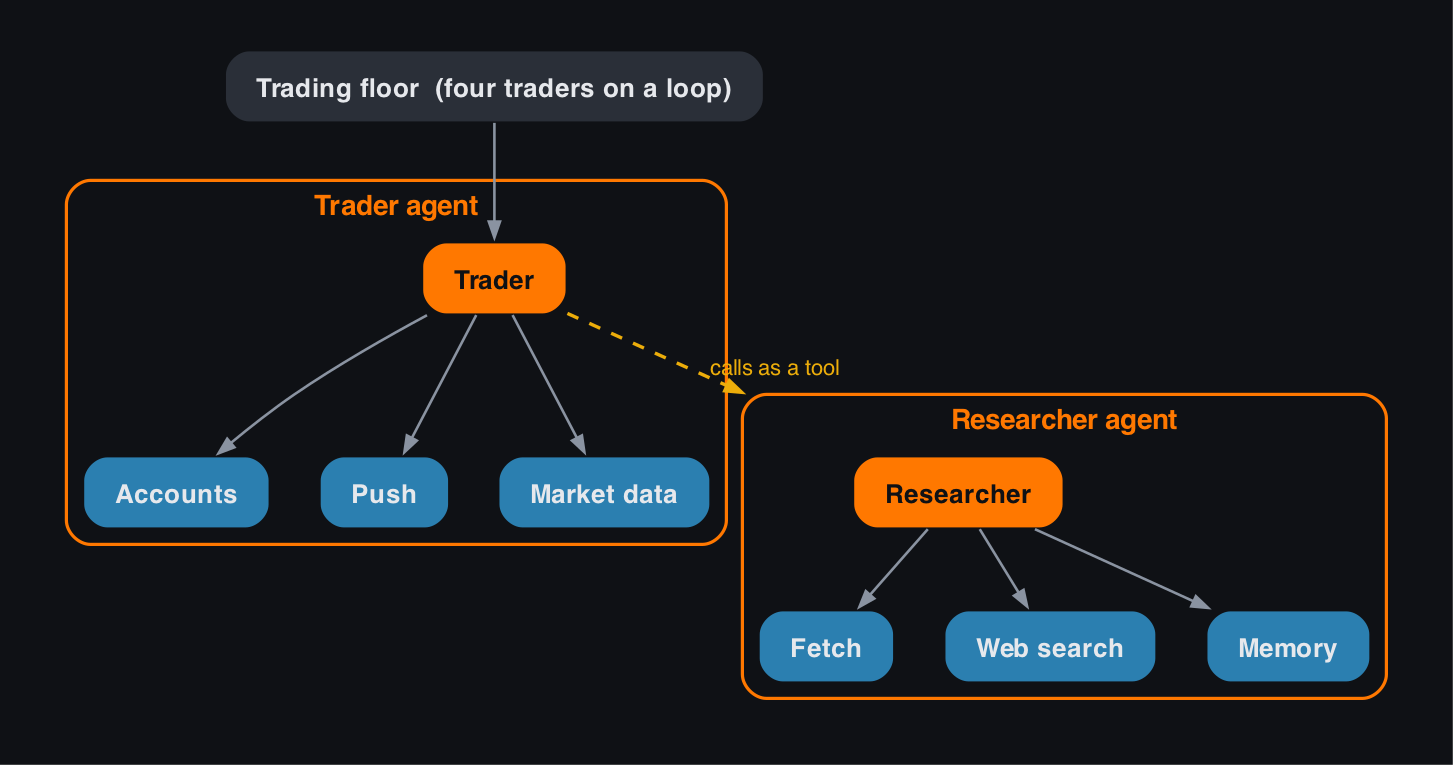
Here is how the pieces fit together. Each of the four traders is an agent with its own MCP servers for accounts, push notifications and market data, and it calls a researcher agent as a tool. The researcher is itself an agent, with its own MCP servers for fetching pages, web search and memory. Orange is an agent, blue is an MCP server, and there are six MCP servers in all.
While I've given the Agents names like "Trader" and "Researcher", my motivation for this architecture was managing the context effectively with the right prompts and tools for reliable outcomes. It's key to avoid the trap of assigning Agent responsibilities just because that's how human teams are organized..
from dotenv import load_dotenv
import json
from contextlib import AsyncExitStack
from agents import Runner, trace, add_trace_processor
from IPython.display import Markdown, display
from backend.market import get_share_price
from backend.accounts import Account
from backend.accounts_client import read_accounts_resource
from backend.reset import reset_traders
from backend.mcp_servers import trader_mcp_servers, researcher_mcp_servers
from backend.traders import get_researcher, get_researcher_tool, Trader
from backend.tracers import LogTracer

load_dotenv(override=True)
A quick note for Windows
Launching a local MCP server from a notebook hits one rough edge on Windows. The server writes its startup output to stderr, but inside a Windows Jupyter kernel that stream has no real file handle behind it, so the launch fails with an io.UnsupportedOperation: fileno error, while Mac and Linux are unaffected.
The fix is to send the server's stderr to the null device, so it always has somewhere real to write. We do that once in the next cell, which lets every MCP server below start cleanly. On Mac and Linux it costs nothing beyond keeping the server's startup banner out of the notebook.
# On Windows, a stdio MCP server started from a Jupyter kernel writes to a stderr stream with no
# real file descriptor and crashes with io.UnsupportedOperation: fileno. We send the server's
# stderr to the null device so it always has somewhere real to write. Mac and Linux are unaffected.
import functools
import subprocess
import agents.mcp.server

agents.mcp.server.stdio_client = functools.partial(agents.mcp.server.stdio_client, errlog=subprocess.DEVNULL)
A tour of the backend
The trading floor is already built as a Python package in backend. Before we run it, let's look at a few of the pieces it gives us.
Market data
get_share_price returns the latest price for a symbol. With a Massive API key it uses live market data; without one it falls back to a simulator, so the floor runs either way.
get_share_price("AAPL")The traders' accounts
Each trader has an account: a balance, holdings, a transaction history and an investment strategy. The Account model is the heart of our home-made Accounts server. Let's reset the four traders to their starting strategies and look at one of them.
Ed note:
I have commented out the first line because I don't want to reset my traders!
# reset_traders()
warren = Account.get("Warren")
print("Balance:", warren.balance)
print("Strategy:", warren.get_strategy())
The MCP servers, and their tools
The trader and the researcher each get their own set of MCP servers, and mcp_servers.py builds them for us. Let's start each one and count the tools they expose.
servers = trader_mcp_servers() + researcher_mcp_servers("Warren")
count = 0
for server in servers:
    async with server:
        tools = await server.list_tools()
        count += len(tools)
print(f"We have {len(servers)} MCP servers, and {count} tools")
The Researcher
The trader does not search the web itself. Instead it calls a Researcher agent as one of its tools. The researcher has its own MCP servers: Fetch to read pages, Tavily for web search, and a Memory it writes to and reads back.
Tavily offers several tools, from plain search to a heavyweight deep-research mode. We restrict its server to tavily_search, which keeps the researcher fast and focused. Choosing which tools an agent can see is itself context engineering.
Wrapping an agent as a tool is different from a handoff: with a tool the trader stays in control and gets the researcher's answer back, where a handoff would pass the whole conversation over.
async with AsyncExitStack() as stack:
    servers = [await stack.enter_async_context(server) for server in researcher_mcp_servers("Warren")]
    researcher = await get_researcher(servers, "gpt-5.4-mini")
    with trace("Researcher"):
        result = await Runner.run(researcher, "What's the latest news on Amazon?", max_turns=30)
display(Markdown(result.final_output))
Look at the trace
Wrapping the researcher as a tool
The trader does not talk to the researcher directly. We turn the whole researcher agent into a tool, and the trader calls it like any other tool. get_researcher_tool does this with researcher.as_tool(...).
researcher_tool = await get_researcher_tool(researcher_mcp_servers("Warren"), "gpt-5.4-mini")
print("Tool name:", researcher_tool.name)
print("Description:", researcher_tool.description)
The Trader
The Trader class in traders.py brings it together. It builds the researcher as a tool, creates the trader agent over the trader's MCP servers (accounts, push and market data) with that tool, and runs it against a message built from the trader's strategy and current account.
There is one more piece worth seeing. The OpenAI Agents SDK lets you plug into its tracing, so you can follow what each agent does in code. tracers.py has a custom trace processor that records each trader's steps to the database, which is how we surface their thinking on the dashboard. We register it now, then run Warren.
add_trace_processor(LogTracer())
warren = Trader("Warren", "Patience", "gpt-5.4-mini")
await warren.run()
How did Warren do?
Reading the account back through its MCP resource shows the trades Warren made and the state of the portfolio.
resources = await read_accounts_resource("Warren")
info = json.loads(resources)
print(info["transactions"][-1])
The whole team, on a loop
trading_floor.py is the full backend implementation. It creates all four traders and runs them on a timer:
while True:
    await asyncio.gather(*[trader.run() for trader in traders])
    await asyncio.sleep(RUN_EVERY_N_MINUTES * 60)
A few optional settings in your .env file control it:
RUN_EVERY_N_MINUTES=60 sets how often the team runs, defaulting to every 60 minutes.
RUN_EVEN_WHEN_MARKET_IS_CLOSED=False decides whether the traders run out of hours.
USE_MANY_MODELS=False runs all four traders on gpt-5.4-mini by default. Set it to true to give each trader a different model: GPT-5.5, DeepSeek V4, Gemini 3.5 Flash and Grok 4.3.
The dashboard
Now let's watch it. The dashboard lives in the demo package, and app.py launches it.
Open a new terminal (the plus on the terminal panel), change to this directory and run the dashboard:
cd 6_mcp
uv run app.py
Then, to set the team trading, open another terminal, change to the same directory and start the engine:
cd 6_mcp
uv run -m backend.trading_floor
Watch the dashboard, and see your trading team in action.
Almost there
You have an autonomous trading floor: four traders, a researcher, six MCP servers, persistent memory and a live dashboard.
In the final lab we give it a production frontend, a separate web app that talks to the same backend.